


ECU boost control mods


Thanks for all your work mrfred. After changing the load variable and the correction delay, boost control is getting really good. I only have two things to bring up..
-On a drag style run though gear 1-4, I still get a dip after gettin back on the gas in the next gear. After that gets fixed, boost control will be complete and precise.
-Since your going though the code, have you found out the differences between the #1, #2, and #3 maps??
Here are my current settings. 21-22 ~ 19
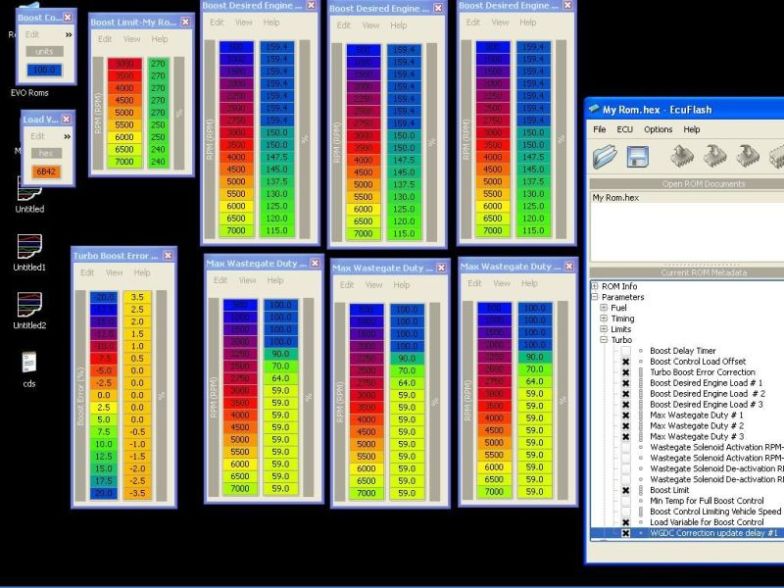
-On a drag style run though gear 1-4, I still get a dip after gettin back on the gas in the next gear. After that gets fixed, boost control will be complete and precise.
-Since your going though the code, have you found out the differences between the #1, #2, and #3 maps??
Here are my current settings. 21-22 ~ 19

Mrfred,
I see some discrepancies between the updated info and what was written previously.
before the update,
MUT8A was listed as "3F0AE"
Updated it is listed now as "3F08E"
On the EVOScan additional entry it refers to RequestID="8B". Isn't "8B" for MUT8B which is longer listed as a required xml mod?
Thanks, Andy
Kind of confused here.
I see some discrepancies between the updated info and what was written previously.
before the update,
MUT8A was listed as "3F0AE"
Updated it is listed now as "3F08E"
On the EVOScan additional entry it refers to RequestID="8B". Isn't "8B" for MUT8B which is longer listed as a required xml mod?
Thanks, Andy
Kind of confused here.

Thread Starter
EvoM Guru
iTrader: (50)
Joined: Mar 2006
Posts: 9,675
Likes: 132
From: Tri-Cities, WA // Portland, OR
Fixed the post. Thanks for spotting those errors. I switched from MUT 8B to 8A on-the-fly, and didn't catch all the needed changes.
Mrfred,
I see some discrepancies between the updated info and what was written previously.
before the update,
MUT8A was listed as "3F0AE"
Updated it is listed now as "3F08E"
On the EVOScan additional entry it refers to RequestID="8B". Isn't "8B" for MUT8B which is longer listed as a required xml mod?
Thanks, Andy
Kind of confused here.
I see some discrepancies between the updated info and what was written previously.
before the update,
MUT8A was listed as "3F0AE"
Updated it is listed now as "3F08E"
On the EVOScan additional entry it refers to RequestID="8B". Isn't "8B" for MUT8B which is longer listed as a required xml mod?
Thanks, Andy
Kind of confused here.


Yes, it should help balance the boost in different gears. However, I've experienced higher boost in higher gears even with these new findings. The issue is simply that even with an identical load% value the engine builds more boost in higher gears.
Mrfred, if you have found some good settings for the error correction map I'd love to see them. I've tried about 8 different maps and have gotten no repeatable or positive results. I can limit the initial spike, but afterward I get a rollercoaster for my boost curve. I've tried small increments in the TBEC table, large increments, and varying bell curves to no avail.
I've tried WGDC delay values from 2 to 5 ... 3 does seem to be the winner. It's the balance between adjusting too much too fast and too little too late.
I'm currently running my previous map with the TBEC at 0 and am using only the WGDC% to regulate load levels, so it would be great to get this narrowed down.
Mrfred, if you have found some good settings for the error correction map I'd love to see them. I've tried about 8 different maps and have gotten no repeatable or positive results. I can limit the initial spike, but afterward I get a rollercoaster for my boost curve. I've tried small increments in the TBEC table, large increments, and varying bell curves to no avail.
I've tried WGDC delay values from 2 to 5 ... 3 does seem to be the winner. It's the balance between adjusting too much too fast and too little too late.
I'm currently running my previous map with the TBEC at 0 and am using only the WGDC% to regulate load levels, so it would be great to get this narrowed down.
Anyway, with the error correction at -20 load set to "0" I ran in to the problem that if the actual boost drops to a value of more than -20 desired load, the TBEC table can no longer correct the boost and you are stuck at -20 desired load until the BWGDC values bring you back within the -20 load range. After that the TBEC table kicks back in and aims for the target load once again. This happened after a serious over-correction by the TBEC table just after peak boost.
Now, this should only ever be encountered when initially tuning the TBEC table, but I just thought I'd mention it in case it happened to someone and they didn't get what was going on.

Instructions for EvoScan
Add the following entry to your EvoScan "Data.xml" file:
-----
<DataListItem DataLog="Y" Color="" Display="Load Error" LogReference="LoadError" RequestID="8A" Eval="5/8*(x/4-32)" Unit="%" MetricEval="" MetricUnit="" ResponseBytes="1" GaugeMin="-100" GaugeMax="100" ChartMin="-100" ChartMax="100" ScalingFactor="1" Notes=""/>
-----
Save the Data.xml file, and you're ready to log Load Error.
Add the following entry to your EvoScan "Data.xml" file:
-----
<DataListItem DataLog="Y" Color="" Display="Load Error" LogReference="LoadError" RequestID="8A" Eval="5/8*(x/4-32)" Unit="%" MetricEval="" MetricUnit="" ResponseBytes="1" GaugeMin="-100" GaugeMax="100" ChartMin="-100" ChartMax="100" ScalingFactor="1" Notes=""/>
-----
Save the Data.xml file, and you're ready to log Load Error.

And also, how do you make those wonderful graphs? sorry for being such a newb.
Yes, it should help balance the boost in different gears. However, I've experienced higher boost in higher gears even with these new findings. The issue is simply that even with an identical load% value the engine builds more boost in higher gears.
Mrfred, if you have found some good settings for the error correction map I'd love to see them. I've tried about 8 different maps and have gotten no repeatable or positive results. I can limit the initial spike, but afterward I get a rollercoaster for my boost curve. I've tried small increments in the TBEC table, large increments, and varying bell curves to no avail.
I've tried WGDC delay values from 2 to 5 ... 3 does seem to be the winner. It's the balance between adjusting too much too fast and too little too late.
I'm currently running my previous map with the TBEC at 0 and am using only the WGDC% to regulate load levels, so it would be great to get this narrowed down.
Mrfred, if you have found some good settings for the error correction map I'd love to see them. I've tried about 8 different maps and have gotten no repeatable or positive results. I can limit the initial spike, but afterward I get a rollercoaster for my boost curve. I've tried small increments in the TBEC table, large increments, and varying bell curves to no avail.
I've tried WGDC delay values from 2 to 5 ... 3 does seem to be the winner. It's the balance between adjusting too much too fast and too little too late.
I'm currently running my previous map with the TBEC at 0 and am using only the WGDC% to regulate load levels, so it would be great to get this narrowed down.


Note I haven't tried this since while I do have mitsulogger I don't use it per se...use at your own RISK:
Code:
<Request LogReference="LoadError" RequestID="8A" Eval="5/8*(x/4-32)" Unit="%" Logged="y" Response="2" Notes="Load Error"/>
Oh and thanks for the work here MrFred. Added this to my rom and hopefully will get a stab this weekend
 .
.
Last edited by codgi; Aug 21, 2007 at 11:00 PM.
One question for those of you who have already done this....if you just make the changes to the rom, do I immediately have to start messing with the TBEC table even if I don't change anything else?

Hey Evo Kid I see your running the gm solenoid also. did you see a big improvement when you added this program to ecuflash? did you have to make major changes to your MWGDC tables or did you leave them as before?
thanks,
ed
thanks,
ed
