


New Maps for Evo 7 and 9


Joined: Mar 2003
Posts: 394
Likes: 7
From: Used to be in Nor Cal, now working in Seoul
ace33joe, the maps dont control the max temp. They control the fan, which does what it can to control the temp. To test the map you need to be logging your engine temp and have the laptop in sight where you can see the fan at the same time. Watch to see when the fan turns on and note the temp. Change the map and then see if it changes the temp when the fan turns on. Cars running a thermostat mont benefit too much from turning the fans on earlier. Usually 81C is about the coolest you will get the car. 99.9% it is the 3 column map. The 9 column may be related to road speed or to turn on the A/C fan if the engine is too hot. Just need some more time for testing.
Since I am still optimizing my boost, AFR, and timing, I did some logging while driving, so I didn't have a chance to look at the fan, but I was logging engine temp while idling and heard engine fan sound when the engine temp reaches 97 degree celcius. The log also shows the maximum engine temp while idling is 97 degree celcius, therefore, I guess the fan starts at 97.
I lowered 100% duty operation temp by 4 degree, and expected the fan will start at 93 or so, but the fan still starts at 97 (detected by sound only) and the log also still shows 97 degree maximum.
Next time I reflash my ECU, I will try your suggested test method.
Thank you.

Okay, so I took your suggestions.
Here is what I have right now. I noticed elsewhere in my XML that I have "Engine Temp" and the definition is different, say for example this ISCV table. Is this wrong or just another address for the same parameter or what?

Look right?
Here is what I have right now. I noticed elsewhere in my XML that I have "Engine Temp" and the definition is different, say for example this ISCV table. Is this wrong or just another address for the same parameter or what?
Look right?

Thread Starter
Evolved Member
Joined: Apr 2008
Posts: 604
Likes: 0
From: Sydney, Australia
The Thermo Fan map looks right. The idle map could be, but it looks wrong to me.
There are usually over 100 scale addresses in each rom, so the one that is used for a particular map will most likely be different for another map. In the away they appear they are just like a map, a group of numbers like an island that are easily spotted in a sea of mess. The correct scale for each map is found through two methods, disassembling the code to see where that map looks at for its scale data and function, and then that is double checked through testing on the vehicle. Each ROM is different. Some have alot more maps than others as the engineers found the need to change things, and so with more data added, the addresses change. Luckily most of the maps themselves are the same from the Evo 7 to 9, just the addresses are different. Finding a map is easy, you just look around the data until you see a bunch of numbers that look like a map at addresses that are not currently used. When you find one, the next step is to check the disassembly to see what it does and the find any scale addresses if they are used. A seasoned tuner will normally have a fairly good idea what the maps function is just from experience which then helps to zoom in on the maps true function.
For the Thermo Fans I actually worked backwards. When I first started with map searching I already had found a scale data range which looked for all the world like a high temperature scale, something the thermo fans or engine protection maps might use. From there I tried to find what map address uses this scale. Once I found it I tested it on the car to verify and sure enough it worked. From there, finding the maps and scales for other roms is quite easy, but of course I cant test it to be 100%.
So as you can see, we dont just guess at the scale data. It is pointed to in the code. On a side note I will try this week to spend some time on the 9-column map to find its real purpose. It was just a map I spotted while screwing around and needed someone to do some testing with it. It does look alot like the thermo fan map and still map be related, I just have not had the time to check it out further.
There are usually over 100 scale addresses in each rom, so the one that is used for a particular map will most likely be different for another map. In the away they appear they are just like a map, a group of numbers like an island that are easily spotted in a sea of mess. The correct scale for each map is found through two methods, disassembling the code to see where that map looks at for its scale data and function, and then that is double checked through testing on the vehicle. Each ROM is different. Some have alot more maps than others as the engineers found the need to change things, and so with more data added, the addresses change. Luckily most of the maps themselves are the same from the Evo 7 to 9, just the addresses are different. Finding a map is easy, you just look around the data until you see a bunch of numbers that look like a map at addresses that are not currently used. When you find one, the next step is to check the disassembly to see what it does and the find any scale addresses if they are used. A seasoned tuner will normally have a fairly good idea what the maps function is just from experience which then helps to zoom in on the maps true function.
For the Thermo Fans I actually worked backwards. When I first started with map searching I already had found a scale data range which looked for all the world like a high temperature scale, something the thermo fans or engine protection maps might use. From there I tried to find what map address uses this scale. Once I found it I tested it on the car to verify and sure enough it worked. From there, finding the maps and scales for other roms is quite easy, but of course I cant test it to be 100%.
So as you can see, we dont just guess at the scale data. It is pointed to in the code. On a side note I will try this week to spend some time on the 9-column map to find its real purpose. It was just a map I spotted while screwing around and needed someone to do some testing with it. It does look alot like the thermo fan map and still map be related, I just have not had the time to check it out further.

On a side note I will try this week to spend some time on the 9-column map to find its real purpose. It was just a map I spotted while screwing around and needed someone to do some testing with it. It does look alot like the thermo fan map and still map be related, I just have not had the time to check it out further.
Thread Starter
Evolved Member
Joined: Apr 2008
Posts: 604
Likes: 0
From: Sydney, Australia
That is already on the list, along with 50 other things. The only difference being that these are duty based and not simply on/off switch types. I just need to do a little more work and find the address to log the fan duty, then I can go to play with varying road speed. For now being able to adjust the fan (at least while stationary) is a good start.
Joined: Mar 2003
Posts: 394
Likes: 7
From: Used to be in Nor Cal, now working in Seoul
Mattjin, just one quick question, so were you able to control the fan using only 3 column map? or did you also change 9 column map? My engine temp log only moves from 89 to 97 degree celcius while I was repeating idling + 3rd gear pull. This number corresponds to "40" value at the On1 column of 9 column map. Although changing either 9 column On1 and 3 column On values did not change my coolant temp min and max value in pretty much same condition (idling + 3rd gear pull).
I hope you can find the address for the fan duty, so that I can do better test with fan control. Thank you.
I hope you can find the address for the fan duty, so that I can do better test with fan control. Thank you.
Thread Starter
Evolved Member
Joined: Apr 2008
Posts: 604
Likes: 0
From: Sydney, Australia
Only the 3-column map. Watching your temps is pointless unless you physically eyeball the fan coming on and off. It is easy to test. Try something like zeroing the first two numbers on the left column and see if the fan comes on later. Same for the middle column, zero maybe 1 of them and see of the fan turns back off at the new temp. The reason this needs to be checked is because it may be different for your rom, but you wont know until you check it. I know it works perfectly on my rom.

Ignition Coil Charge Time maps for the Evo9. JB, after you test them please post for confirmation.
***** WARNING *****
DO NOT ADJUST THESE MAPS UNLESS YOU KNOW THEIR EXACT PURPOSE. IF YOU DO ADJUST THEM INCORRECTLY IT IS HIGHLY LIKELY YOU WILL BURN OUT THE COILS. DON'T SAY YOU HAVEN'T BEEN WARNED.
For 88590015:
<table name="Ignition Coil Charge Time" category="Timing" address="3cc6" type="2D" level="2" scaling="uint8">
<table name="Battery" address="6e0c" type="X Axis" elements="9" scaling="BatteryVoltage"/>
</table>
<table name="Ignition Coil Charge Time (Unknown 1)" category="Timing" address="3cd6" type="2D" level="2" scaling="uint8">
<table name="Battery" address="6e0c" type="X Axis" elements="9" scaling="BatteryVoltage"/>
</table>
<table name="Ignition Coil Charge Time (Unknown 2)" category="Timing" address="3ce6" type="2D" level="2" scaling="uint8">
<table name="Battery" address="6e0c" type="X Axis" elements="9" scaling="BatteryVoltage"/>
</table>
***** WARNING *****
DO NOT ADJUST THESE MAPS UNLESS YOU KNOW THEIR EXACT PURPOSE. IF YOU DO ADJUST THEM INCORRECTLY IT IS HIGHLY LIKELY YOU WILL BURN OUT THE COILS. DON'T SAY YOU HAVEN'T BEEN WARNED.
For 88590015:
<table name="Ignition Coil Charge Time" category="Timing" address="3cc6" type="2D" level="2" scaling="uint8">
<table name="Battery" address="6e0c" type="X Axis" elements="9" scaling="BatteryVoltage"/>
</table>
<table name="Ignition Coil Charge Time (Unknown 1)" category="Timing" address="3cd6" type="2D" level="2" scaling="uint8">
<table name="Battery" address="6e0c" type="X Axis" elements="9" scaling="BatteryVoltage"/>
</table>
<table name="Ignition Coil Charge Time (Unknown 2)" category="Timing" address="3ce6" type="2D" level="2" scaling="uint8">
<table name="Battery" address="6e0c" type="X Axis" elements="9" scaling="BatteryVoltage"/>
</table>
Excellent answer Mattjin. Thank you.
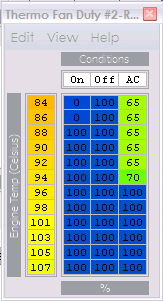
This is how I've changed mine. Of course I can't log fan duty but I believe that changing my "65"s etc to 100 made the fan sound much louder when it kicked on. I didn't really want to decrease the activating temp but I want the fan to be at 100% when it does come on so that it gets temps down asap. Should help at Summit Point this weekend.
I'm honestly more interested in the A/C fan itself because as a pusher it is right behind my intercooler and right in front of my turbo (where I've been getting overheating and melting problems) I'd like to be able to kick that fan on all the time in race situations.
Keep up the great work.
lol, I'm not even adding those ignition definitions yet. I'm not touching that w/ a 10ft pole.
This is how I've changed mine. Of course I can't log fan duty but I believe that changing my "65"s etc to 100 made the fan sound much louder when it kicked on. I didn't really want to decrease the activating temp but I want the fan to be at 100% when it does come on so that it gets temps down asap. Should help at Summit Point this weekend.
I'm honestly more interested in the A/C fan itself because as a pusher it is right behind my intercooler and right in front of my turbo (where I've been getting overheating and melting problems) I'd like to be able to kick that fan on all the time in race situations.
Keep up the great work.
lol, I'm not even adding those ignition definitions yet. I'm not touching that w/ a 10ft pole.
Last edited by honki24; Oct 7, 2008 at 09:04 AM.

So why would the "off" column have 100% listed throughout if its "off"? It looks more like the first column is the pusher fan (a/c fan), second column is the puller fan (main fan) and the 3rd column is the pusher fan when the A/C is activated. Yes..no..maybe?

Just disabled my cold start ignition retard and I found the same thing. The car no longer feel like I have a wave machine for a throttle body. Acceleration is much smoother and I no longer need to warm the car up before trying to drive.
Thread Starter
Evolved Member
Joined: Apr 2008
Posts: 604
Likes: 0
From: Sydney, Australia
It is just some reverse logic. 100% (128) just means "ON" until it gets to the temperature. Try changing it and you will see what it does.
eg. Based on Honki24's pic of his map
Change the first column to 0 , 0 , 0 , 0 , 100, 100 , 100 ... etc
Change second column to 0,0,100,100,100,100 ... etc
What you will see is the fan will come on hard at 92C and then will switch back off when the temp drops below 88.
The third column is the duty the main fan runs at while the AC fan is on. Normally the main fan will run while AC is ON even if the engine temp is cold. You can stop this happening by making the first number "0", then it only turns on if AC is ON and temp is above that point.
The 9-column map could also be related to the A/C fan. The columns that dont become active until the temp is very hot could be a backup to turn the AC fan on to help cooling. Again, I just need time to check this out. Its alot quicker to phyically test this than to pull apart the code (well maybe for me anyway :-)
eg. Based on Honki24's pic of his map
Change the first column to 0 , 0 , 0 , 0 , 100, 100 , 100 ... etc
Change second column to 0,0,100,100,100,100 ... etc
What you will see is the fan will come on hard at 92C and then will switch back off when the temp drops below 88.
The third column is the duty the main fan runs at while the AC fan is on. Normally the main fan will run while AC is ON even if the engine temp is cold. You can stop this happening by making the first number "0", then it only turns on if AC is ON and temp is above that point.
The 9-column map could also be related to the A/C fan. The columns that dont become active until the temp is very hot could be a backup to turn the AC fan on to help cooling. Again, I just need time to check this out. Its alot quicker to phyically test this than to pull apart the code (well maybe for me anyway :-)
The A/C fan definitely turns on if temps exceed a certain "oh ****!!" temp. Every car with a seperate A/C fan has the A/C fan act as an emergency fan in this situation. You could set it up so both fans are on at the same time whenever the main fan is triggered to help speed up the cooling process. Most manufacturers probably don't do this already because of the noise it creates when both fans are on, plus the larger current draw on the electrical system.