


New Maps for Evo 7 and 9


no thats what happens to me, change 1 bit the other 7 highlight like you have changed them as well.
I had the Hex16 window up as well and it changed from 0x56DA to 0x54DA when I changed bit 9 to 0... so I would say its ok
I had the Hex16 window up as well and it changed from 0x56DA to 0x54DA when I changed bit 9 to 0... so I would say its ok

EvoM Guru
iTrader: (50)
Joined: Mar 2006
Posts: 9,675
Likes: 132
From: Tri-Cities, WA // Portland, OR
You're right. I just looked at it again, and you're exactly right. The cells highlight like something has changed, but only the intended cell changes. And I could only get it to work using the +/- and not using =. I should still talk to Colby about fixing it up.

Evolved Member
Joined: Aug 2007
Posts: 569
Likes: 1
From: UK
The first 8 bits all relate to the first byte and the 2nd 8 bits relate to the last byte.
So imo it is correct in what it is doing, as it shows you that byte of data has been changed.


Thread Starter
Evolved Member
Joined: Apr 2008
Posts: 604
Likes: 0
From: Sydney, Australia
Hey Dave, I just discovered the purpose of one of the maps you found but didn't know what it did. In the thread about EGR tables that Mr Fred mentioned a couple of pages ago you have a picture of alot of maps that you dont know the purpose. The top left one is the one I uncovered today....
It is the Limp Home TPS Fuel Table. If the MAF is unplugged the ECU relies on TPS and RPM to limp the car home. Adjusting this table adjusts the fuel mixtures.
For 88580015:
<table name="Limp Home - TPS Fuel Table" category="Fuel" address="31ab" type="3D" level="2" swapxy="true" scaling="uint8">
<table name="TPS" address="70ce" type="X Axis" elements="7" scaling="Volts16"/>
<table name="Engine Speed" address="70ba" type="Y Axis" elements="5" scaling="RPM"/>
</table>
The map finding continues!
It is the Limp Home TPS Fuel Table. If the MAF is unplugged the ECU relies on TPS and RPM to limp the car home. Adjusting this table adjusts the fuel mixtures.
For 88580015:
<table name="Limp Home - TPS Fuel Table" category="Fuel" address="31ab" type="3D" level="2" swapxy="true" scaling="uint8">
<table name="TPS" address="70ce" type="X Axis" elements="7" scaling="Volts16"/>
<table name="Engine Speed" address="70ba" type="Y Axis" elements="5" scaling="RPM"/>
</table>
The map finding continues!
Thread Starter
Evolved Member
Joined: Apr 2008
Posts: 604
Likes: 0
From: Sydney, Australia
I may have got the thermo fan maps wrong. All along I have wondered why my car responds to only a 3x12 map, not a 9x12 map as for others. It doesnt help that I dont have another car at the moment to test it on. Anyway, here is the other map for 88580015 that could be the thermo fan map. I need people to respond back if they have successfully tested the maps. So again, test and report back if this map works.
For 88580015:
<table name="Thermo Fan Duty #2" category="Misc" address="5114" type="3D" level="2" swapxy="true" scaling="Percent (128)">
<table name="Conditions" type="Static X Axis" elements="3">
<data>On</data>
<data>Off</data>
<data>A/C</data>
</table>
<table name="Engine Temp" address="713c" type="Y Axis" elements="12" scaling="Temp"/>
</table>
The easiest way to test is to replace the zeroes in the left column at the top with the same number as below them. If you flash it in and the fan is on all the time then the test is successful.
eg, for 88580015 for this map in the left column we see
0,0,65,65,65,70,70,70,70,100,100,100
Change it to 65,65,65,65 etc...
The reason for checking this is that I stumbled onto the same 9x12 map in my own rom that I thought did not exist, and it did not turn on the fans. If there is anyone currently testing the Thermo Fan maps and wants the 3x12 map I will post for other roms.
For 88580015:
<table name="Thermo Fan Duty #2" category="Misc" address="5114" type="3D" level="2" swapxy="true" scaling="Percent (128)">
<table name="Conditions" type="Static X Axis" elements="3">
<data>On</data>
<data>Off</data>
<data>A/C</data>
</table>
<table name="Engine Temp" address="713c" type="Y Axis" elements="12" scaling="Temp"/>
</table>
The easiest way to test is to replace the zeroes in the left column at the top with the same number as below them. If you flash it in and the fan is on all the time then the test is successful.
eg, for 88580015 for this map in the left column we see
0,0,65,65,65,70,70,70,70,100,100,100
Change it to 65,65,65,65 etc...
The reason for checking this is that I stumbled onto the same 9x12 map in my own rom that I thought did not exist, and it did not turn on the fans. If there is anyone currently testing the Thermo Fan maps and wants the 3x12 map I will post for other roms.
Last edited by Mattjin; Sep 3, 2008 at 02:11 AM. Reason: Additions

Evolving Member

Joined: May 2008
Posts: 141
Likes: 0
From: Rome
I may have got the thermo fan maps wrong. All along I have wondered why my car responds to only a 3x12 map, not a 9x12 map as for others. It doesnt help that I dont have another car at the moment to test it on. Anyway, here is the other map for 88580015 that could be the thermo fan map. I need people to respond back if they have successfully tested the maps. So again, test and report back if this map works.
For 88580015:[cut]
For 88580015:[cut]
Is it right?

Last edited by SkyNight; Sep 3, 2008 at 06:14 AM.

Thread Starter
Evolved Member
Joined: Apr 2008
Posts: 604
Likes: 0
From: Sydney, Australia
The temperatures will only be worth changing if you have also changed the thermostat to a different opening temperature. If not you will struggle to get the temps any lower. You can try bringing the fans on a few degrees lower and see how it effects things but usually this is pretty well set at a factory to its optimum. Getting the car to run colder will also mean having to edit alot of the maps that go with it, such as the EGR related maps which really kick in just below 80C.

Mattjin or mrfred, could you provide a bit of insight into this particular table on 96530006, ie. is it actually a cold-start ignition table? Does it play into the low-coolant timing trim tables located for other ROMs? (I came across this in an old thread over on Aktivematrix; I didn't actually locate it myself, and haven't had time to fire up IDA to look at any of this in a few months now.  )
)
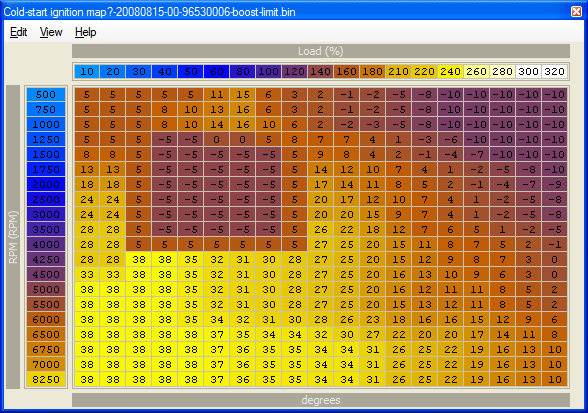
I'm hoping this might provide a bit of assistance with the E85 cold-start issues everyone starts having right about now. (Unless you're razorlab, living in the land of perpetual comfort. )
)Code:
<table name="Cold-start ignition map?" category="Timing" address="61c9" type="3D" swapxy="true" scaling="Timing">
	<table name="Load" address="6910" type="X Axis" elements="19" scaling="Load"/>
	<table name ="RPM" address="68de" type="Y Axis" elements="20" scaling="RPM"/>
</table>
I'm hoping this might provide a bit of assistance with the E85 cold-start issues everyone starts having right about now.
(Unless you're razorlab, living in the land of perpetual comfort. )
Last edited by logic; Sep 9, 2008 at 09:22 AM. Reason: typo'd the ROM id


Thread Starter
Evolved Member
Joined: Apr 2008
Posts: 604
Likes: 0
From: Sydney, Australia
I am in Australia and we dont use vegie juice in those concentrations, so I have not experience working with it to know what needs to be done. ;-)
It looks like a Timing map that is only used in Neutral. With it is a 2D map that looks like a control map similar to the Warmup Retard Control map.
<table name="Ignition Unknown Control" category="Timing" address="61b6" type="2D" level="2" scaling="uint8">
<table name="Engine Temp" address="6a36" type="X Axis" elements="8" scaling="Temp"/>
</table>
You can try zeroing this 2D map and see if it stops looking at the 3D map.
It looks like a Timing map that is only used in Neutral. With it is a 2D map that looks like a control map similar to the Warmup Retard Control map.
<table name="Ignition Unknown Control" category="Timing" address="61b6" type="2D" level="2" scaling="uint8">
<table name="Engine Temp" address="6a36" type="X Axis" elements="8" scaling="Temp"/>
</table>
You can try zeroing this 2D map and see if it stops looking at the 3D map.
Last edited by Mattjin; Sep 9, 2008 at 03:18 PM. Reason: Small changes
Ah, I suspected there might be a control map that went with that. I'll give this a try tomorrow morning, and see if the car is a little more amenable to starting.
(For those unfamiliar with the problem: E85 is difficult to ignite at lower temperatures, which is why you see the actual mixture change with temperature, at least in the US. For example, here in Chicago we end up with a 70% mixture/E70 in winter, while Hawaii never changes from an 85% mix. One theory floated a while back was that more timing at startup would help with starting issues; another idea I came across elsewhere was heating the fuel prior to the injectors, perhaps at the filter, to help it ignite.)
(For those unfamiliar with the problem: E85 is difficult to ignite at lower temperatures, which is why you see the actual mixture change with temperature, at least in the US. For example, here in Chicago we end up with a 70% mixture/E70 in winter, while Hawaii never changes from an 85% mix. One theory floated a while back was that more timing at startup would help with starting issues; another idea I came across elsewhere was heating the fuel prior to the injectors, perhaps at the filter, to help it ignite.)

Forgive me for not quoting the person, but I've copied all the important post info into a word document.... but in regards to this:
thanks!, beat me to it...
here are the rest for 0008
<table name="Decel Fuel Cut Delay - Neutral A/C Off" category="Fuel" address="42bc" type="2D" level="2" scaling="uint8">
<table name="Load" address="650a" type="Y Axis" elements="7" scaling="Load"/>
</table>
<table name="Decel Fuel Cut Delay - In Gear A/C Off" category="Fuel" address="42ca" type="2D" level="2" scaling="uint8">
<table name="Load" address="650a" type="Y Axis" elements="7" scaling="Load"/>
</table>
<table name="Decel Fuel Cut Delay - Neutral A/C On" category="Fuel" address="42d8" type="2D" level="2" scaling="uint8">
<table name="Load" address="650a" type="Y Axis" elements="7" scaling="Load"/>
</table>
<table name="Decel Fuel Cut Delay - In Gear A/C On" category="Fuel" address="42e6" type="2D" level="2" scaling="uint8">
<table name="Load" address="650a" type="Y Axis" elements="7" scaling="Load"/>
</table>
<table name="Decel Fuel Cut Ignition Retard" category="Fuel" address="4300" type="2D" level="2" scaling="Timing">
<table name="Engine Speed" address="61da" type="Y Axis" elements="10" scaling="RPM"/>
</table>
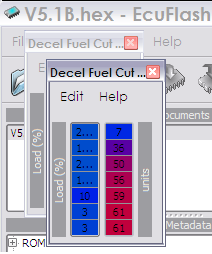
What is the 94170014 equivalent? The variables look fine but load is crazy. Which load scaling should I use?
This is what I see:
thanks!, beat me to it...
here are the rest for 0008
<table name="Decel Fuel Cut Delay - Neutral A/C Off" category="Fuel" address="42bc" type="2D" level="2" scaling="uint8">
<table name="Load" address="650a" type="Y Axis" elements="7" scaling="Load"/>
</table>
<table name="Decel Fuel Cut Delay - In Gear A/C Off" category="Fuel" address="42ca" type="2D" level="2" scaling="uint8">
<table name="Load" address="650a" type="Y Axis" elements="7" scaling="Load"/>
</table>
<table name="Decel Fuel Cut Delay - Neutral A/C On" category="Fuel" address="42d8" type="2D" level="2" scaling="uint8">
<table name="Load" address="650a" type="Y Axis" elements="7" scaling="Load"/>
</table>
<table name="Decel Fuel Cut Delay - In Gear A/C On" category="Fuel" address="42e6" type="2D" level="2" scaling="uint8">
<table name="Load" address="650a" type="Y Axis" elements="7" scaling="Load"/>
</table>
<table name="Decel Fuel Cut Ignition Retard" category="Fuel" address="4300" type="2D" level="2" scaling="Timing">
<table name="Engine Speed" address="61da" type="Y Axis" elements="10" scaling="RPM"/>
</table>
What is the 94170014 equivalent? The variables look fine but load is crazy. Which load scaling should I use?
This is what I see: