


96530706 + DMA +LiveMap + SD - working


I just filled up with E85 today, and boy, this stuff is great!  I maxed out my EBC and the stock turbo without even tuning yet.
Anyway, about the 1250s. I started with the scaling/latency posted by Ted B and a couple others, and it worked fine, in terms of fuel trims. But, the scaling was just too high and verified via WOT pulls. For example, stock injectors WOT were about 11.3-11.5 and 1250s were about 12.3-12.5.
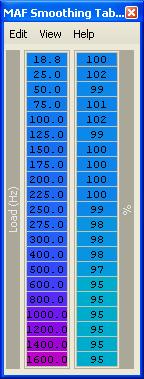
So, I reworked the scaling back to a more reasonable number and tweaked the latencies some more. However, there was no latency adjustment that would get the low trim in place while sticking with my lower (correct) injector scaling. So, I used the maf smoothing table to adjust the LTFT Low back in line. I added about 10% (IIRC) to the first two cells of the MAF smoothing.
Let me fire up my laptop and I will post what I have right now. Also, I have run these for about a week now on pump gas and cold start is great...hot start is great...warm start is good. It started out less than good, and I have been playing with the IPW starting/running tables. (Actually just made maybe two quick adjustments and haven't gotten back to it). But, for now, it starts fine for warm starts, but may need a little tweaking to make it perfect. Since I'm on E85 now though, I am going to run E85 as long as I can (as the weather permits...gets pretty damn cold here in the winter), so I may be tweaking the E85 settings and will revisit my pump gas settings later, if need be.
Eric
I maxed out my EBC and the stock turbo without even tuning yet.Anyway, about the 1250s. I started with the scaling/latency posted by Ted B and a couple others, and it worked fine, in terms of fuel trims. But, the scaling was just too high and verified via WOT pulls. For example, stock injectors WOT were about 11.3-11.5 and 1250s were about 12.3-12.5.
So, I reworked the scaling back to a more reasonable number and tweaked the latencies some more. However, there was no latency adjustment that would get the low trim in place while sticking with my lower (correct) injector scaling. So, I used the maf smoothing table to adjust the LTFT Low back in line. I added about 10% (IIRC) to the first two cells of the MAF smoothing.
Let me fire up my laptop and I will post what I have right now. Also, I have run these for about a week now on pump gas and cold start is great...hot start is great...warm start is good. It started out less than good, and I have been playing with the IPW starting/running tables. (Actually just made maybe two quick adjustments and haven't gotten back to it). But, for now, it starts fine for warm starts, but may need a little tweaking to make it perfect. Since I'm on E85 now though, I am going to run E85 as long as I can (as the weather permits...gets pretty damn cold here in the winter), so I may be tweaking the E85 settings and will revisit my pump gas settings later, if need be.
Eric
Last edited by l2r99gst; Aug 29, 2009 at 01:24 PM.
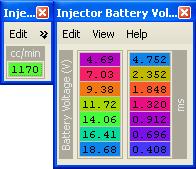
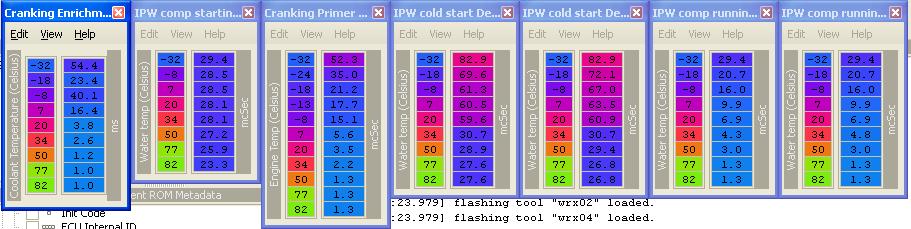
OK, here are the setting that I ended up with (for now) for the FIC BlueMax 1250s. Also, not shown here is that I took out most of the cold start ignition trim. Actually that has a side effect of revving high, so I will have to also adjust one of the ISCV tables as well.
But, anyway, here are my settings:
Pump gas (93) scaling and latency:
Pump gas (93) and global IPW settings:
Maf smoothing adjustment (right side is scaled to percent(128)):
E85 alt scaling and IPW adder:

I know I will have to add a lot more in the colder temps for E85, but I just starting my E85 tuning today.
Eric
But, anyway, here are my settings:
Pump gas (93) scaling and latency:
Pump gas (93) and global IPW settings:
Maf smoothing adjustment (right side is scaled to percent(128)):
E85 alt scaling and IPW adder:
I know I will have to add a lot more in the colder temps for E85, but I just starting my E85 tuning today.
Eric

They are pertty important for getting warm starts, cold starts, hot starts to work perfectly. BTW, I noticed that the cranking enrichment IPW adder table I posted above had a mistake in it. The second cell should be a larger number.
Anyway, the tables for your ROM are located somewhere in this forum. Just search and you will find them.
Eric
Anyway, the tables for your ROM are located somewhere in this forum. Just search and you will find them.
Eric


Eric,
Thanks for posting those numbers, I had the injector scaling "one click" leaner (1271), and my latency tables were close to what you had. I was prob another weeks worth of logs away from getting the correct numbers. I put in your numbers this AM and they were spot on to get me right at 14.7 ish during all parts of cruise (low vac and Hi vac), I've been trying to just tune it in open loop since the idle was lean and that was throwing everything off.
Now all I need to do is richen up the idle with the airflow table and I'll be good to go.
Almost time to switch to SD!
Thanks again,
Thanks for posting those numbers, I had the injector scaling "one click" leaner (1271), and my latency tables were close to what you had. I was prob another weeks worth of logs away from getting the correct numbers. I put in your numbers this AM and they were spot on to get me right at 14.7 ish during all parts of cruise (low vac and Hi vac), I've been trying to just tune it in open loop since the idle was lean and that was throwing everything off.
Now all I need to do is richen up the idle with the airflow table and I'll be good to go.
Almost time to switch to SD!
Thanks again,

Newbie
Joined: Jun 2007
Posts: 14
Likes: 0
Eric, is it possible you can also do a step by step method for having the MAF scaling and MAF compensation maps in RAM as well? I can't quite seem to figure that part out. Also, have you experienced that IPW problem with the larger injectors or did it get desensitized?
I haven't tried SD with my new injectors yet. I'm working on wrapping up my new CarPC install as well as finalizing my E85 tune. Once those are done, I will test SD again with the new injectors.
I can write a step by step on how to move maps to RAM...that's not a problem.
Eric
I can write a step by step on how to move maps to RAM...that's not a problem.
Eric
Eric, is it possible you can also do a step by step method for having the MAF scaling and MAF compensation maps in RAM as well? I can't quite seem to figure that part out. Also, have you experienced that IPW problem with the larger injectors or did it get desensitized?
The basic steps to add any map to RAM is:
1. Copy the map header and contents to an empty space is your alt maps space, so that you have an identical map in that altmap space.
2. Change the pointer to the map's ROM address by clicking the cross reference to the header and changing the address that points back to the ROM address of the map and change that to the RAM address where you just created that copy of the map in step #1.
Obviously, for step #2, you need IDA Pro to get the address for the pointer change. Then, you create the XML def in ECUFlash to make the change, similar to how I posted back on the first page. You change that address that points to the ROM map to the RAM address (FFFF XXXX).
Remember that the altmap section starts at A000, so you have to calculate where you are adding your new map header and map data. For example, maybe you add it starting at A7C0 (like I did with the map ve data). That is why I have a definition for the alt maps space, so that it will be a little easier to see what the address is that you are using for RAM.
Last edited by l2r99gst; Sep 26, 2009 at 06:37 PM.
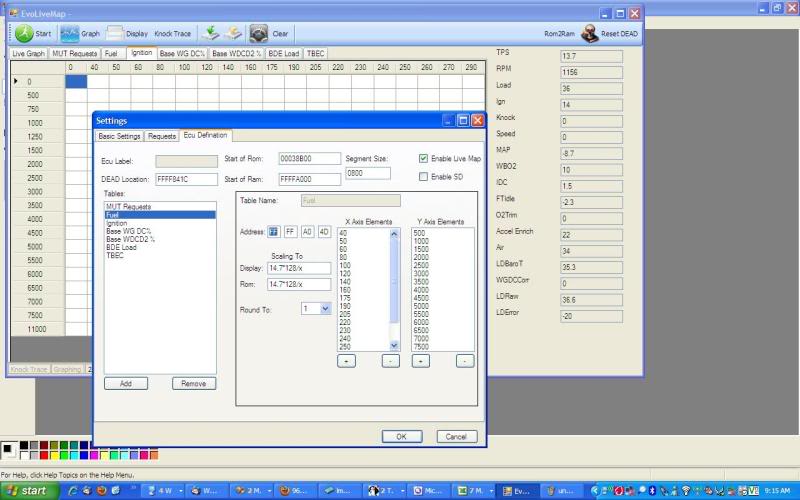
ok not sure if there is any need but seeing this looks like the main thread on evom about live mapping, i might as well put it here.
anyway its a little rewrite of JB's app. the main features are
1)multiple version of xml config files
2)easily add new items that u can request. possibly be able to sort the order of items logged without changing the mut table. easily be able to add new tables to read/write. be almost as good as evoscan and address some features of evoscan that i wanted.
3) graphing and pull mode (where it displays on the areas where TPS=100... .so u can quickly check the graph of the pull)
4) offline dead reset. in the VIII the ram is not rewritten and hence the DEAD var has to be manually reset, unfortunately (atleast on my car) this mean if the mut is in ram the original program wont start the logger as the mut table is also corrupted. this connects to ecu and resets the dead and then disconnects.
5) can import your current xml files.
6) one main screen for all the logging so u dont have to change tabs to start stop the logger (pain for me anyway)
7) use a proper expression to calculate things like scaling for displaying maps, scaling for requests. and most importantly able to log things which are calculated from multiple request items, eg IDC, 2byte mut requests etc etc.
things it doesnt do (maybe soon)
1) error checking i am working on it
2) muti-threading
3) still uses vb.net
4) auto smoothing and dyno/power displayed on the graph.
5) hot-key feature to turn off/on the logger like evoscan.
6) write changes made to maps back to a rom file.
pics are below, if people are interested to test the app i will put the binary up here.
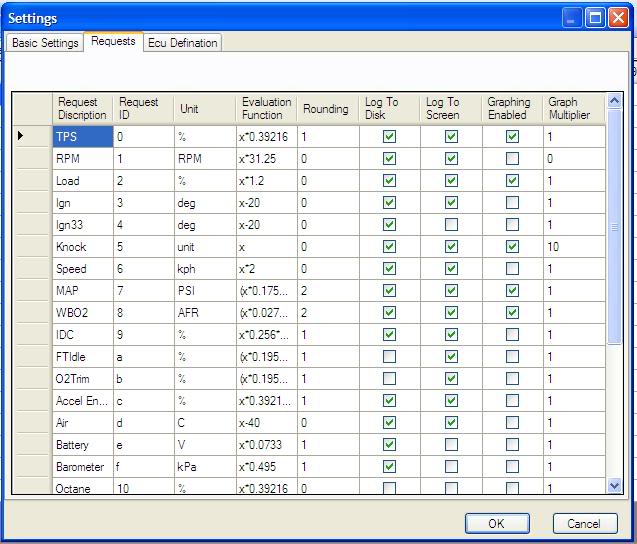
anyway its a little rewrite of JB's app. the main features are
1)multiple version of xml config files
2)easily add new items that u can request. possibly be able to sort the order of items logged without changing the mut table. easily be able to add new tables to read/write. be almost as good as evoscan and address some features of evoscan that i wanted.
3) graphing and pull mode (where it displays on the areas where TPS=100... .so u can quickly check the graph of the pull)
4) offline dead reset. in the VIII the ram is not rewritten and hence the DEAD var has to be manually reset, unfortunately (atleast on my car) this mean if the mut is in ram the original program wont start the logger as the mut table is also corrupted. this connects to ecu and resets the dead and then disconnects.
5) can import your current xml files.
6) one main screen for all the logging so u dont have to change tabs to start stop the logger (pain for me anyway)
7) use a proper expression to calculate things like scaling for displaying maps, scaling for requests. and most importantly able to log things which are calculated from multiple request items, eg IDC, 2byte mut requests etc etc.
things it doesnt do (maybe soon)
1) error checking
i am working on it2) muti-threading
3) still uses vb.net
4) auto smoothing and dyno/power displayed on the graph.
5) hot-key feature to turn off/on the logger like evoscan.
6) write changes made to maps back to a rom file.
pics are below, if people are interested to test the app i will put the binary up here.
Last edited by ziad; Oct 3, 2009 at 03:45 PM.
Awesome updates. I was just about to look into multithreading, but since my VB skills are weak, it would have probably taken me a long time. Maybe I will let you handle it. : )
I've noticed that with all of the updates that I have made, the logging speed has been affected, so I wanted to keep that in it's own thread and just have the screen display updated every so many cycles.
Sure, post up what you have. I would love to take a look.
I've noticed that with all of the updates that I have made, the logging speed has been affected, so I wanted to keep that in it's own thread and just have the screen display updated every so many cycles.
Sure, post up what you have. I would love to take a look.
ok its up. to test it, put the zip file into a folder and extract it. then copy your zedgraph dll file version 5.1.5.28844 into the same directory. it should do the rest. yes the startup errors dont look good yet.
it will create a default dummy ecu definations file. dis-regard it. goto settings window (button is next to clear button), under the "basic settings" tab click the "create" button. there give it a name... currently it has to be 8 characters long minimum. it will import your defs from the old live map folder.... hopefully
its a rar file renamed as zip.
let me know how many errors u get during load up. i have compiled as a release so that hopefully it gives some stack traces if and when there are problems.
also once u come back from the settings screen wait for a couple of seconds before doing anything for some strange reason it takes a couple of seconds to load up the datatable in the datagridview to show the rows columns and if u r too quick it hasnt and will crash
it will create a default dummy ecu definations file. dis-regard it. goto settings window (button is next to clear button), under the "basic settings" tab click the "create" button. there give it a name... currently it has to be 8 characters long minimum. it will import your defs from the old live map folder.... hopefully
its a rar file renamed as zip.
let me know how many errors u get during load up. i have compiled as a release so that hopefully it gives some stack traces if and when there are problems.
also once u come back from the settings screen wait for a couple of seconds before doing anything for some strange reason it takes a couple of seconds to load up the datatable in the datagridview to show the rows columns and if u r too quick it hasnt and will crash
Last edited by ziad; Oct 4, 2009 at 07:08 PM.

It worked for me; rename download to whatever.rar, and you'll have to download the latest version of ZedGraph for it to not puke at startup.
ziad, any chance you'll be releasing the source for this as well?
(Edit: nevermind, it looks like he deleted the attachment?)
ziad, any chance you'll be releasing the source for this as well?
(Edit: nevermind, it looks like he deleted the attachment?)