


Does the 2014 Evo touchscreen radio support back up camera?


Newbie
Joined: Dec 2007
Posts: 46
Likes: 0
From: MIAMI


Evolving Member
Joined: Apr 2014
Posts: 252
Likes: 2
From: Sumner, wa
if anybody is looking for a good camera and DOES NOT want to drill the bumper....look at the ALPINE camera. it can be mounted on a license plate frame and looks pretty sweet if you ask me
link to camera - http://www.alpine-usa.com/product/view/hce-c155/
link to frame - http://www.alpine-usa.com/product/view/ktx-c10lp
Ive done A LOT of these cameras in customer cars with great results and im installing the same unit on my MR (using the stock non-nav RF unit) over the weekend so ill have some pics for you guys
link to camera - http://www.alpine-usa.com/product/view/hce-c155/
link to frame - http://www.alpine-usa.com/product/view/ktx-c10lp
Ive done A LOT of these cameras in customer cars with great results and im installing the same unit on my MR (using the stock non-nav RF unit) over the weekend so ill have some pics for you guys
Last edited by jakeleclair2000; Aug 13, 2014 at 02:32 PM.

Newbie
Joined: Jun 2014
Posts: 11
Likes: 0
From: sask
Here is a better photo. It's the top two with the red arrows. I'm not sure when he'll get back to me.
You'll have to trial and error to figure out which one goes where, but it shouldn't be hard to narrow down between the two.
Sorry I don't have all the answers as far as wiring it up, like I said my friend is the one who figured out what went where and actually knows how to wire things in.
I can push packages on SCCM but can't wire a backup camera lol.
Oh as a warning when he was first trying to figure out the pin out he did blow a fuse for the radio, one of the fuses under the dash. So if you are poking around and your radio display wont come on, check the fuses, I think it was one of those little 10 amps.
This is the pin out from my original posting he gave me
On 8 pin grey plug...
Pin 1 is power output
Pin 2 reverse sensor wire
Pin 3 is video signal ground (negative)
Pin 4 - n/a
Pin 5 is ground
Pin 6 - n/a
Pin 7 below is video signal (positive)

You'll have to trial and error to figure out which one goes where, but it shouldn't be hard to narrow down between the two.
Sorry I don't have all the answers as far as wiring it up, like I said my friend is the one who figured out what went where and actually knows how to wire things in.
I can push packages on SCCM but can't wire a backup camera lol.
Oh as a warning when he was first trying to figure out the pin out he did blow a fuse for the radio, one of the fuses under the dash. So if you are poking around and your radio display wont come on, check the fuses, I think it was one of those little 10 amps.
This is the pin out from my original posting he gave me
On 8 pin grey plug...
Pin 1 is power output
Pin 2 reverse sensor wire
Pin 3 is video signal ground (negative)
Pin 4 - n/a
Pin 5 is ground
Pin 6 - n/a
Pin 7 below is video signal (positive)
Newbie
Joined: Dec 2007
Posts: 46
Likes: 0
From: MIAMI
Pin 2 (white wire) is the reverse sensor wire
Pin 5 (black wire on bottom left of plug) is ground
Those three wires are pre installed from factory onto that 8 pin gray connector.
The two wires that were added were on Pins 3 and 7 (two black wires in picture) those two wires come from the camera.
There's no set up needed in the menus to enable the camera (at least for me). Simply put the car in reverse, and the camera comes on.
Hope this clears it up a bit.
Newbie
Joined: Jun 2014
Posts: 11
Likes: 0
From: sask
Pin 1 (red wire) is power
Pin 2 (white wire) is the reverse sensor wire
Pin 5 (black wire on bottom left of plug) is ground
Those three wires are pre installed from factory onto that 8 pin gray connector.
The two wires that were added were on Pins 3 and 7 (two black wires in picture) those two wires come from the camera.
There's no set up needed in the menus to enable the camera (at least for me). Simply put the car in reverse, and the camera comes on.
Hope this clears it up a bit.
Pin 2 (white wire) is the reverse sensor wire
Pin 5 (black wire on bottom left of plug) is ground
Those three wires are pre installed from factory onto that 8 pin gray connector.
The two wires that were added were on Pins 3 and 7 (two black wires in picture) those two wires come from the camera.
There's no set up needed in the menus to enable the camera (at least for me). Simply put the car in reverse, and the camera comes on.
Hope this clears it up a bit.
On my grey plug I have all 8 holes already filled with wires. There are no empty slots.
This is what I am understanding , you had to run two wires from the grey plug to the camera video + and - now are the power ground snd reverse sensor wire spliced into as well and run to the camera as well?
Newbie
Joined: Jun 2014
Posts: 11
Likes: 0
From: sask
[QUOIE=Psybin;11280493]Check post 90 about powering the camera.[/QUOTE]
Got It , my problem was the factory camera has 5 wires which I was trying to hook up and could not
get it. What I did was hook the power wire to the reverse wire (the white one) wire 2 I believe than 3 and 7 for the video positive and negative and ground to body and it works perfectly!
Got It , my problem was the factory camera has 5 wires which I was trying to hook up and could not
get it. What I did was hook the power wire to the reverse wire (the white one) wire 2 I believe than 3 and 7 for the video positive and negative and ground to body and it works perfectly!
Newbie
Joined: Dec 2007
Posts: 46
Likes: 0
From: MIAMI
Got It , my problem was the factory camera has 5 wires which I was trying to hook up and could not
get it. What I did was hook the power wire to the reverse wire (the white one) wire 2 I believe than 3 and 7 for the video positive and negative and ground to body and it works perfectly![/QUOTE]
That's exactly what psybin's installed said NOT to do. He suggested to not power the camera from the gray connector like you did. You used the white wire from the gray connector to power the camera.
He suggested you power it off the MAIN power connector on the radio.
get it. What I did was hook the power wire to the reverse wire (the white one) wire 2 I believe than 3 and 7 for the video positive and negative and ground to body and it works perfectly![/QUOTE]
That's exactly what psybin's installed said NOT to do. He suggested to not power the camera from the gray connector like you did. You used the white wire from the gray connector to power the camera.
He suggested you power it off the MAIN power connector on the radio.
Newbie
Joined: Dec 2007
Posts: 46
Likes: 0
From: MIAMI
Got It , my problem was the factory camera has 5 wires which I was trying to hook up and could not
get it. What I did was hook the power wire to the reverse wire (the white one) wire 2 I believe than 3 and 7 for the video positive and negative and ground to body and it works perfectly!
get it. What I did was hook the power wire to the reverse wire (the white one) wire 2 I believe than 3 and 7 for the video positive and negative and ground to body and it works perfectly!
He suggested you power it off acc/ground
Newbie
Joined: Jun 2014
Posts: 11
Likes: 0
From: sask
No, he said not to power it off the red wire on the grey plug. The white wire only has power coming to it when the car is in reverse. I figure why have power to the camera all the time or just when you need it? Makes more sense to me this way.

Newbie
Joined: Jul 2007
Posts: 14
Likes: 0
From: East Bay, CA
Got PSI, i'm a bit confused on how you hooked up the camera. I have one very similar to yours but I only have 1 wire to plug into the dash unit which is a big yellow plug, where do I get the two for the grey plug?
EDIT: I think I found the answer. Please correct me if I'm wrong. You cut the yellow RCA head off to expose two wires?
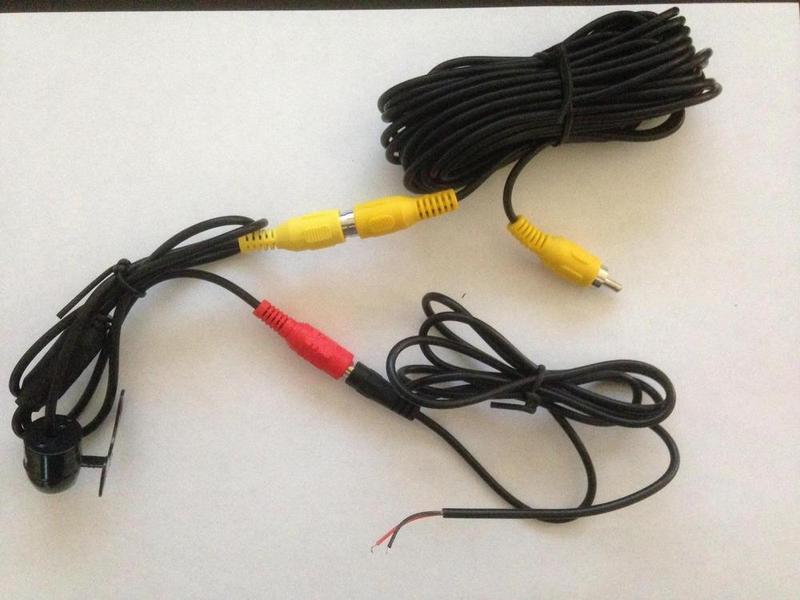
EDIT: I think I found the answer. Please correct me if I'm wrong. You cut the yellow RCA head off to expose two wires?
Last edited by pa1ntbru5h; Sep 1, 2014 at 09:31 PM.