


The PCMScan Thread


Evolving Member
Joined: Oct 2007
Posts: 158
Likes: 0
From: Boston
Stoked:
I'm still seeing that you cap out at 75inHg though. I think the reason your boost is going past the 22/23 that we see is due to the way in which pcmscan does that calculation:
ManifoldRelativePressurePSI - BarometricPressurePSI - 14.70
Perhaps in your case the 14.7 psi (atmospheric pressure at sea level) constant is not quite accurate if your @ a higher altitude?

I'm still seeing that you cap out at 75inHg though. I think the reason your boost is going past the 22/23 that we see is due to the way in which pcmscan does that calculation:
ManifoldRelativePressurePSI - BarometricPressurePSI - 14.70
Perhaps in your case the 14.7 psi (atmospheric pressure at sea level) constant is not quite accurate if your @ a higher altitude?

Stoked:
I'm still seeing that you cap out at 75inHg though. I think the reason your boost is going past the 22/23 that we see is due to the way in which pcmscan does that calculation:
ManifoldRelativePressurePSI - BarometricPressurePSI - 14.70
Perhaps in your case the 14.7 psi (atmospheric pressure at sea level) constant is not quite accurate if your @ a higher altitude?
I'm still seeing that you cap out at 75inHg though. I think the reason your boost is going past the 22/23 that we see is due to the way in which pcmscan does that calculation:
ManifoldRelativePressurePSI - BarometricPressurePSI - 14.70
Perhaps in your case the 14.7 psi (atmospheric pressure at sea level) constant is not quite accurate if your @ a higher altitude?
 When I made the post last night I was a little confused over reports of the cap being 1.5 bar.
 The AP recently received some firmware updates that apparently allows logging beyond the cap. Maybe if we ask nicely...

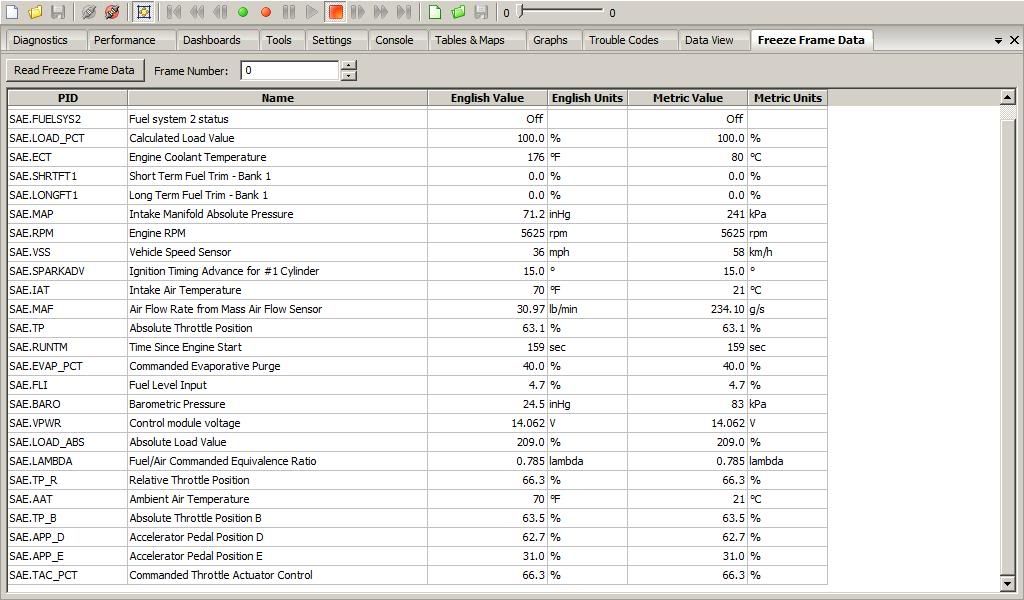
Here you can see I'm showing barometric pressure of 83 kPa = 12.0 psi:
Evolving Member
Joined: Oct 2007
Posts: 158
Likes: 0
From: Boston


I know that  I guess my question should have been stated better. Basically, in the image in post 77 there are multiple Throttle parameters, but do any of those go to 100% at WOT. I have only tested the one that goes to ~87%.
Anyone test the others?
The reason I want 100% is that it makes it much easier to edit the log once it is exported in csv format. Finding 100 is much easier than finding 87. It might not be possible to get 100 given that the Evo X has a throttle by wire.
I guess my question should have been stated better. Basically, in the image in post 77 there are multiple Throttle parameters, but do any of those go to 100% at WOT. I have only tested the one that goes to ~87%. Anyone test the others?
The reason I want 100% is that it makes it much easier to edit the log once it is exported in csv format. Finding 100 is much easier than finding 87. It might not be possible to get 100 given that the Evo X has a throttle by wire.
I know that I guess my question should have been stated better. Basically, in the image in post 77 there are multiple Throttle parameters, but do any of those go to 100% at WOT. I have only tested the one that goes to ~87%.
Anyone test the others?
The reason I want 100% is that it makes it much easier to edit the log once it is exported in csv format. Finding 100 is much easier than finding 87. It might not be possible to get 100 given that the Evo X has a throttle by wire.
I guess my question should have been stated better. Basically, in the image in post 77 there are multiple Throttle parameters, but do any of those go to 100% at WOT. I have only tested the one that goes to ~87%. Anyone test the others?
The reason I want 100% is that it makes it much easier to edit the log once it is exported in csv format. Finding 100 is much easier than finding 87. It might not be possible to get 100 given that the Evo X has a throttle by wire.


Evolving Member
Joined: Sep 2007
Posts: 209
Likes: 0
From: Over there!
Let me guess, PCMScan crashed at some point and you killed it? LOL. A couple of us have had this problem. I managed to solve it by uninstalling the Tactrix Drivers from the device manager, (deleting them completely off the computer), then uninstalling ECUFlash, then PCMScan. Then, reboot, and reinstall ECUFlash and then PCMScan. That fixed the wild bouncing/crazy values.
verkion
verkion



My car is going on the dyno again Friday. In addition to the UICP, exhaust components and the GST boost pill are going in.
I don't want to use PCMScan to log (at all), so I might spring for an EcuTeK license on this car so I can have a real logger.
I don't want to use PCMScan to log (at all), so I might spring for an EcuTeK license on this car so I can have a real logger.
Before mrfred figured out how to log WGDCC, we tuned ECU boost w/o it. If you know how WGDC and BDEL interact, then tuning ECU boost should be very easy.
Besides, I am sure that Bryan provided you with all the WGDC and BDEL settings necessary for the pill.

questions for you guys
I'm trying to log timing but my RPM's and Load are going crazy, do you guys know what PID's i need to check or uncheck for it to work properly? and which goes on the columns and rows? Do i also need to change the min and max counts of each?
also, I have an AEM wideband, what do i need to do to have PCMscan read it and log?
I'm trying to log timing but my RPM's and Load are going crazy, do you guys know what PID's i need to check or uncheck for it to work properly? and which goes on the columns and rows? Do i also need to change the min and max counts of each?
also, I have an AEM wideband, what do i need to do to have PCMscan read it and log?
Evolving Member
Joined: Sep 2007
Posts: 209
Likes: 0
From: Over there!
See Quote...I ran into this problem, and this is how I fixed it.
Let me guess, PCMScan crashed at some point and you killed it? LOL. A couple of us have had this problem. I managed to solve it by uninstalling the Tactrix Drivers from the device manager, (deleting them completely off the computer), then uninstalling ECUFlash, then PCMScan. Then, reboot, and reinstall ECUFlash and then PCMScan. That fixed the wild bouncing/crazy values.
verkion
verkion