


New Maps for Evo 7 and 9


Joined: Mar 2003
Posts: 394
Likes: 7
From: Used to be in Nor Cal, now working in Seoul
I may have got the thermo fan maps wrong. All along I have wondered why my car responds to only a 3x12 map, not a 9x12 map as for others. It doesnt help that I dont have another car at the moment to test it on. Anyway, here is the other map for 88580015 that could be the thermo fan map. I need people to respond back if they have successfully tested the maps. So again, test and report back if this map works.
For 88580015:
<table name="Thermo Fan Duty #2" category="Misc" address="5114" type="3D" level="2" swapxy="true" scaling="Percent (128)">
<table name="Conditions" type="Static X Axis" elements="3">
<data>On</data>
<data>Off</data>
<data>A/C</data>
</table>
<table name="Engine Temp" address="713c" type="Y Axis" elements="12" scaling="Temp"/>
</table>
The easiest way to test is to replace the zeroes in the left column at the top with the same number as below them. If you flash it in and the fan is on all the time then the test is successful.
eg, for 88580015 for this map in the left column we see
0,0,65,65,65,70,70,70,70,100,100,100
Change it to 65,65,65,65 etc...
The reason for checking this is that I stumbled onto the same 9x12 map in my own rom that I thought did not exist, and it did not turn on the fans. If there is anyone currently testing the Thermo Fan maps and wants the 3x12 map I will post for other roms.
For 88580015:
<table name="Thermo Fan Duty #2" category="Misc" address="5114" type="3D" level="2" swapxy="true" scaling="Percent (128)">
<table name="Conditions" type="Static X Axis" elements="3">
<data>On</data>
<data>Off</data>
<data>A/C</data>
</table>
<table name="Engine Temp" address="713c" type="Y Axis" elements="12" scaling="Temp"/>
</table>
The easiest way to test is to replace the zeroes in the left column at the top with the same number as below them. If you flash it in and the fan is on all the time then the test is successful.
eg, for 88580015 for this map in the left column we see
0,0,65,65,65,70,70,70,70,100,100,100
Change it to 65,65,65,65 etc...
The reason for checking this is that I stumbled onto the same 9x12 map in my own rom that I thought did not exist, and it did not turn on the fans. If there is anyone currently testing the Thermo Fan maps and wants the 3x12 map I will post for other roms.
Thank you so much for the great info. It would be great if you can post Thermo Fan Duty #2 map address for 94170008. I am very interested in Fan control.
Thank you again!

Thread Starter
Evolved Member
Joined: Apr 2008
Posts: 604
Likes: 0
From: Sydney, Australia
For 94170008:
<table name="Thermo Fan Duty #2" category="Misc" address="553a" type="3D" level="2" swapxy="true" scaling="uint8">
<table name="Conditions" type="Static X Axis" elements="3">
<data>On</data>
<data>Off</data>
<data>A/C</data>
</table>
<table name="Y" address="65a4" type="Y Axis" elements="12" scaling="Temp"/>
</table>
Have fun, and post some feedback if it works.
<table name="Thermo Fan Duty #2" category="Misc" address="553a" type="3D" level="2" swapxy="true" scaling="uint8">
<table name="Conditions" type="Static X Axis" elements="3">
<data>On</data>
<data>Off</data>
<data>A/C</data>
</table>
<table name="Y" address="65a4" type="Y Axis" elements="12" scaling="Temp"/>
</table>
Have fun, and post some feedback if it works.
Thread Starter
Evolved Member
Joined: Apr 2008
Posts: 604
Likes: 0
From: Sydney, Australia
No problem.
I am pretty sure it is going to be the 3 column map. I am more starting to theorise that the 9 column map is related to overtemp fuel and ignition trimming. I just need to do some hot testing when summer comes.
I am pretty sure it is going to be the 3 column map. I am more starting to theorise that the 9 column map is related to overtemp fuel and ignition trimming. I just need to do some hot testing when summer comes.
Joined: Mar 2003
Posts: 394
Likes: 7
From: Used to be in Nor Cal, now working in Seoul
I haven't had a chance to test it yet, but I guess 12x9 map seems right because ECU also considers vehicle speed for fan control. Therefore, when the car is moving it will not turn on the fan until it becomes really hot.
It is just my guess, though.
It is just my guess, though.
Thread Starter
Evolved Member
Joined: Apr 2008
Posts: 604
Likes: 0
From: Sydney, Australia
Ignition Coil Charge Time maps for the Evo9. JB, after you test them please post for confirmation.
***** WARNING *****
DO NOT ADJUST THESE MAPS UNLESS YOU KNOW THEIR EXACT PURPOSE. IF YOU DO ADJUST THEM INCORRECTLY IT IS HIGHLY LIKELY YOU WILL BURN OUT THE COILS. DON'T SAY YOU HAVEN'T BEEN WARNED.
For 88590015:
<table name="Ignition Coil Charge Time" category="Timing" address="3cc6" type="2D" level="2" scaling="uint8">
<table name="Battery" address="6e0c" type="X Axis" elements="9" scaling="BatteryVoltage"/>
</table>
<table name="Ignition Coil Charge Time (Unknown 1)" category="Timing" address="3cd6" type="2D" level="2" scaling="uint8">
<table name="Battery" address="6e0c" type="X Axis" elements="9" scaling="BatteryVoltage"/>
</table>
<table name="Ignition Coil Charge Time (Unknown 2)" category="Timing" address="3ce6" type="2D" level="2" scaling="uint8">
<table name="Battery" address="6e0c" type="X Axis" elements="9" scaling="BatteryVoltage"/>
</table>
***** WARNING *****
DO NOT ADJUST THESE MAPS UNLESS YOU KNOW THEIR EXACT PURPOSE. IF YOU DO ADJUST THEM INCORRECTLY IT IS HIGHLY LIKELY YOU WILL BURN OUT THE COILS. DON'T SAY YOU HAVEN'T BEEN WARNED.
For 88590015:
<table name="Ignition Coil Charge Time" category="Timing" address="3cc6" type="2D" level="2" scaling="uint8">
<table name="Battery" address="6e0c" type="X Axis" elements="9" scaling="BatteryVoltage"/>
</table>
<table name="Ignition Coil Charge Time (Unknown 1)" category="Timing" address="3cd6" type="2D" level="2" scaling="uint8">
<table name="Battery" address="6e0c" type="X Axis" elements="9" scaling="BatteryVoltage"/>
</table>
<table name="Ignition Coil Charge Time (Unknown 2)" category="Timing" address="3ce6" type="2D" level="2" scaling="uint8">
<table name="Battery" address="6e0c" type="X Axis" elements="9" scaling="BatteryVoltage"/>
</table>
Last edited by Mattjin; Sep 22, 2008 at 03:13 AM.
Joined: Mar 2003
Posts: 394
Likes: 7
From: Used to be in Nor Cal, now working in Seoul
I will try the 3 column map and see if it works.
Thank you again!
Not looking so good for 94170014:

I tried fiddling around w/ addresses... remember I'm the code idiot.
Are the values in the table supposed to be "throttle % for the cooling fan" in effect? I didn't know the fan could be throttled. (clearly mine is way off anyways since if that is true you couldn't get 128% fan duty)
I tried fiddling around w/ addresses... remember I'm the code idiot.
Are the values in the table supposed to be "throttle % for the cooling fan" in effect? I didn't know the fan could be throttled. (clearly mine is way off anyways since if that is true you couldn't get 128% fan duty)
Last edited by honki24; Sep 29, 2008 at 12:53 PM.
Joined: Mar 2003
Posts: 394
Likes: 7
From: Used to be in Nor Cal, now working in Seoul
Actually the map looks a little bit strange to me, because it seems the fan is not turned on until I hit 97 degrees, but according to the map, it should start as low fan speed at around 88 degree (65 duty cycle), and going to medium fan speed at 94 (70 duty cycle), then going full speed at 103 (100 duty cycle)?
Do we have multiple fan speed modes? It seems the fan is turned on full speed at around 97 degrees only.
Hope this helps finding the right map for fan control.
Thank you for your efforts!
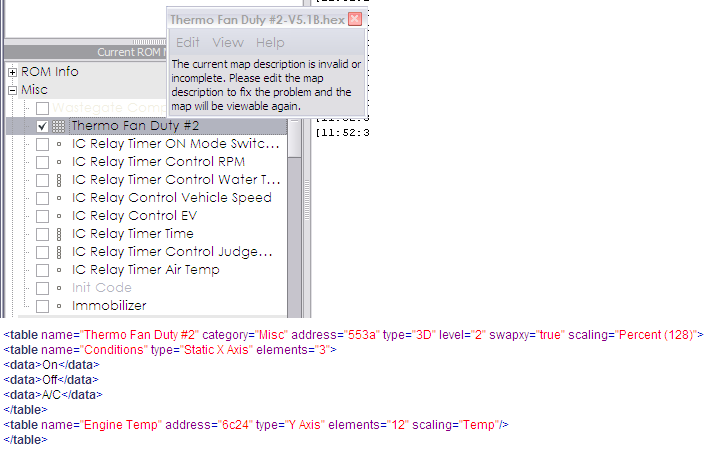
I have read the whole thread. The info is everywhere. Too disorganized for someone unfamiliar with code to figure out. Perhaps this is it though:
Okay. To be clear, what needs to be added to a 94170014 or similar variant is the following (for the fan map):
And I got this:
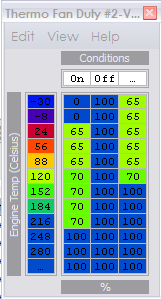
Seems to look correct now... all except for that stupid display problem w/ 1.35+.
Okay. To be clear, what needs to be added to a 94170014 or similar variant is the following (for the fan map):
Code:
<scaling name="Percent (128)" units="%" toexpr="x/1.28" frexpr="x*1.28" format="%.0f" min="0" max="100" inc="1" storagetype="uint8" endian="big"/>

<table name="Thermo Fan Duty #2" category="Misc" address="553a" type="3D" level="2" swapxy="true" scaling="Percent (128)">
<table name="Conditions" type="Static X Axis" elements="3">
<data>On</data>
<data>Off</data>
<data>A/C</data>
</table>
<table name="Engine Temp" address="6c24" type="Y Axis" elements="12" scaling="Temp"/>
</table>
Seems to look correct now... all except for that stupid display problem w/ 1.35+.
Last edited by honki24; Oct 3, 2008 at 10:52 AM.
Thread Starter
Evolved Member
Joined: Apr 2008
Posts: 604
Likes: 0
From: Sydney, Australia
Yeap, you got it! :-) See that wasnt so hard, just a little time to search.
Your temp scale address is wrong. Just change it to 67f8 and remove the / from A/C (make it AC) and you are right to go. Mine displays A/C but maybe different versions have problems with that symbol in the code.
ace33joe, the maps dont control the max temp. They control the fan, which does what it can to control the temp. To test the map you need to be logging your engine temp and have the laptop in sight where you can see the fan at the same time. Watch to see when the fan turns on and note the temp. Change the map and then see if it changes the temp when the fan turns on. Cars running a thermostat mont benefit too much from turning the fans on earlier. Usually 81C is about the coolest you will get the car. 99.9% it is the 3 column map. The 9 column may be related to road speed or to turn on the A/C fan if the engine is too hot. Just need some more time for testing.
Did anyone find the MUT address to log thermofan duty? I havent spent enough time on this to look yet.
Your temp scale address is wrong. Just change it to 67f8 and remove the / from A/C (make it AC) and you are right to go. Mine displays A/C but maybe different versions have problems with that symbol in the code.
ace33joe, the maps dont control the max temp. They control the fan, which does what it can to control the temp. To test the map you need to be logging your engine temp and have the laptop in sight where you can see the fan at the same time. Watch to see when the fan turns on and note the temp. Change the map and then see if it changes the temp when the fan turns on. Cars running a thermostat mont benefit too much from turning the fans on earlier. Usually 81C is about the coolest you will get the car. 99.9% it is the 3 column map. The 9 column may be related to road speed or to turn on the A/C fan if the engine is too hot. Just need some more time for testing.
Did anyone find the MUT address to log thermofan duty? I havent spent enough time on this to look yet.
Last edited by Mattjin; Oct 3, 2008 at 03:00 PM.