


AEM UEGO Serial Cable Instructions


thanx


Since I still get quite a few questions about the how to make the AEM serial output cable here is a general how-to...
1. Go to an electronics store or online shop and purchase a DB-9 (rs-232) female recepticale like this

2. Also purchase a DB-9 backshell like this

3. Purchase some 18 guage wire (about 8 feet). I used blue and black, but it doesn't need to be a different color.
4. Purchase a terminal lug that you can fit one of the bolts that go to the chassis to for grounding purposes. Here is an example.

5. You will need to solder the connections so you will need a soldering iron, heat shrink, and solder.
6. Connect one wire (approximately 4 feet in length) to pin 2 on the DB-9 connector and connect one wire (apporximately 4 feet in length) to pin 5 on the DB-9 connector. Heat shrink the wire after solder has cooled.
7. Connect your terminal lug to the wire that is coming from pin 5 on the DB-9 connector.
8. Finished product should look something like this...
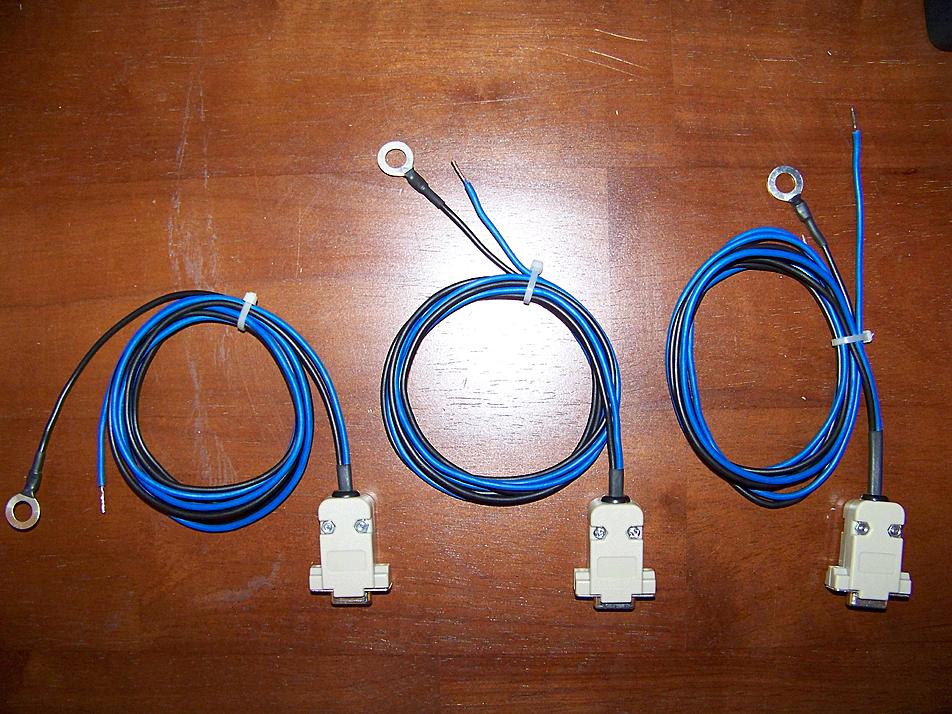
9. The wire from pin 2 on the DB-9 connector needs to be soldered (and heat shrinked) to the blue "analog" wire that feeds off the back of the AEM UEGO.
10. Connect the terminal lug to chassis ground, and mount the connector where you have easy access to it.
11. You will also need to purchase a serial to usb converter (one that is Vista compatible if you have Vista) and follow the software install instructions. You can pick one up HERE
12. Go to start/control panel/system/hardware/device manager and find the serial to usb converter. Double click on this and go to advanced settings and reconfigure the COM port so it is set up on Com Port 3. Save and exit.
13. After software is installed and the com port is configured, connect the serial to USB converter to the cable you just made, then connect it the usb side into the computer. Open Evoscan and go to the wideband tab on the top of the screen and configure the com port to COM port 3 as this is what you set up the serial to USB for.
Make sure to check the Wideband O2 on the left of the screen so Evoscan knows to log it now.
Connect your Tactrix cable up to the computer now, and start the car, start Evoscan and see if everything works...
1. Go to an electronics store or online shop and purchase a DB-9 (rs-232) female recepticale like this
2. Also purchase a DB-9 backshell like this
3. Purchase some 18 guage wire (about 8 feet). I used blue and black, but it doesn't need to be a different color.
4. Purchase a terminal lug that you can fit one of the bolts that go to the chassis to for grounding purposes. Here is an example.
5. You will need to solder the connections so you will need a soldering iron, heat shrink, and solder.
6. Connect one wire (approximately 4 feet in length) to pin 2 on the DB-9 connector and connect one wire (apporximately 4 feet in length) to pin 5 on the DB-9 connector. Heat shrink the wire after solder has cooled.
7. Connect your terminal lug to the wire that is coming from pin 5 on the DB-9 connector.
8. Finished product should look something like this...
9. The wire from pin 2 on the DB-9 connector needs to be soldered (and heat shrinked) to the blue "analog" wire that feeds off the back of the AEM UEGO.
10. Connect the terminal lug to chassis ground, and mount the connector where you have easy access to it.
11. You will also need to purchase a serial to usb converter (one that is Vista compatible if you have Vista) and follow the software install instructions. You can pick one up HERE
12. Go to start/control panel/system/hardware/device manager and find the serial to usb converter. Double click on this and go to advanced settings and reconfigure the COM port so it is set up on Com Port 3. Save and exit.
13. After software is installed and the com port is configured, connect the serial to USB converter to the cable you just made, then connect it the usb side into the computer. Open Evoscan and go to the wideband tab on the top of the screen and configure the com port to COM port 3 as this is what you set up the serial to USB for.
Make sure to check the Wideband O2 on the left of the screen so Evoscan knows to log it now.
Connect your Tactrix cable up to the computer now, and start the car, start Evoscan and see if everything works...


Newbie
Joined: Mar 2009
Posts: 3
Likes: 0
From: Florida
PLEASE! I need this too.. evil_evo8mr@yahoo.com





i planned to, but can't find it to download. i hit up EvoScan Support and they say to try 2.7, which i've heard there are bugs.. though they show a "final" version listed after the betas.
i'll try 2.7 only 'cause i can't find 2.5 anywhere.
i'll try 2.7 only 'cause i can't find 2.5 anywhere.