


New Maps for Evo 7 and 9


Thread Starter
Evolved Member
Joined: Apr 2008
Posts: 604
Likes: 0
From: Sydney, Australia
Alrighty, time for some real genius ;-)
I did a little playing around with the thermo fans tonight while dropping back some dvds (yeah you guessed it, late). I managed to find the MUT address to log the thermo fan duty. Try Request 84.
Now, what do the maps do. The 3-column map is active while stationary and up to roughly 20km/h. The 9-column map is active at different road speeds. Roughly from observation and a little logging, the first column is for over ~20km/h, the second column is for over ~50km/h, and the third column I have not tested yet, being the middle of the night in a residential area here. The middle three columns are Off values from what I can see so far, and the right three columns are for A/C conditions.
I did a little playing around with the thermo fans tonight while dropping back some dvds (yeah you guessed it, late). I managed to find the MUT address to log the thermo fan duty. Try Request 84.
Now, what do the maps do. The 3-column map is active while stationary and up to roughly 20km/h. The 9-column map is active at different road speeds. Roughly from observation and a little logging, the first column is for over ~20km/h, the second column is for over ~50km/h, and the third column I have not tested yet, being the middle of the night in a residential area here. The middle three columns are Off values from what I can see so far, and the right three columns are for A/C conditions.

Evolving Member
Joined: Apr 2007
Posts: 195
Likes: 1
From: Slovakia
3 column thermo fan map for 96530006:
<table name="Thermo Fan Duty #2" category="Misc" address="575c" type="3D" level="2" swapxy="true" scaling="Percent (128)">
<table name="Conditions" type="Static X Axis" elements="3">
<data>On</data>
<data>Off</data>
<data>A/C</data>
</table>
<table name="Engine Temp" address="6a14" type="Y Axis" elements="12" scaling="Temp"/>
</table>
<table name="Thermo Fan Duty #2" category="Misc" address="575c" type="3D" level="2" swapxy="true" scaling="Percent (128)">
<table name="Conditions" type="Static X Axis" elements="3">
<data>On</data>
<data>Off</data>
<data>A/C</data>
</table>
<table name="Engine Temp" address="6a14" type="Y Axis" elements="12" scaling="Temp"/>
</table>


Joined: Mar 2003
Posts: 394
Likes: 7
From: Used to be in Nor Cal, now working in Seoul
Alrighty, time for some real genius ;-)
I did a little playing around with the thermo fans tonight while dropping back some dvds (yeah you guessed it, late). I managed to find the MUT address to log the thermo fan duty. Try Request 84.
Now, what do the maps do. The 3-column map is active while stationary and up to roughly 20km/h. The 9-column map is active at different road speeds. Roughly from observation and a little logging, the first column is for over ~20km/h, the second column is for over ~50km/h, and the third column I have not tested yet, being the middle of the night in a residential area here. The middle three columns are Off values from what I can see so far, and the right three columns are for A/C conditions.
I did a little playing around with the thermo fans tonight while dropping back some dvds (yeah you guessed it, late). I managed to find the MUT address to log the thermo fan duty. Try Request 84.
Now, what do the maps do. The 3-column map is active while stationary and up to roughly 20km/h. The 9-column map is active at different road speeds. Roughly from observation and a little logging, the first column is for over ~20km/h, the second column is for over ~50km/h, and the third column I have not tested yet, being the middle of the night in a residential area here. The middle three columns are Off values from what I can see so far, and the right three columns are for A/C conditions.

Okay, I think I got the 9-column thermo right, but what about the two ignition maps... what have I screwed up there? (94170014 Evo 8)
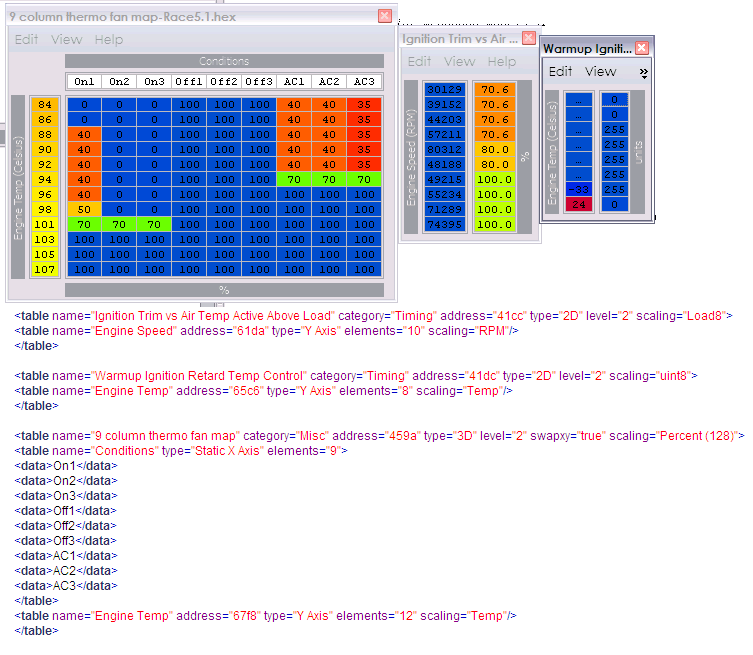
Edit: One more question. If I just disable FAA bit 9 I don't have to worry about the warmup ignition table, right?
Edit: One more question. If I just disable FAA bit 9 I don't have to worry about the warmup ignition table, right?
Last edited by honki24; Oct 10, 2008 at 06:00 AM.

Thread Starter
Evolved Member
Joined: Apr 2008
Posts: 604
Likes: 0
From: Sydney, Australia
I got my cable working again and did a bit more testing on the Thermo maps. Logging 84 in Evoscan shows thermo fan duty, but I am not sure which of the fans. They both come on together, but during A/C the front fan comes on harder. What 84 appears to log is the front fan. In any case, the 3-column map is in effect when stationary and up to 22km/h. The 9-column map works as follows. First from 22km/h, the second column from 52km/h, and the 3rd column from 82km/h. The same values repeat for 4,5,6 columns, but I have not found how to log what the 7,8,9 columns do but the labells should be the same. To me it appears as 7,8,9 are the rear fan duty when A/C is on, which is how it responded in the 3-column map. 4,5,6 seems to be a duty for the A/C front fan. I changed some duties in these columns and it definitely reacts to A/C being on. Strange! Earlier testing should the middle column of the 3-column map to respond to turning the fans off. If I can track down how to log the other fan I can find out things more exactly but for now we have a better understanding of what is going on.
For 97250001 they are at 4252 and at 4ac8
For 97250001 they are at 4252 and at 4ac8
Last edited by Mattjin; Oct 12, 2008 at 11:23 PM.


Okay, here's what I've got for 94170014 so far. I'm guessing my "Percent (128)" scaling on the warmup map is incorrect. It was at "unit8". What in the world are those values? They don't make sense with either scaling.
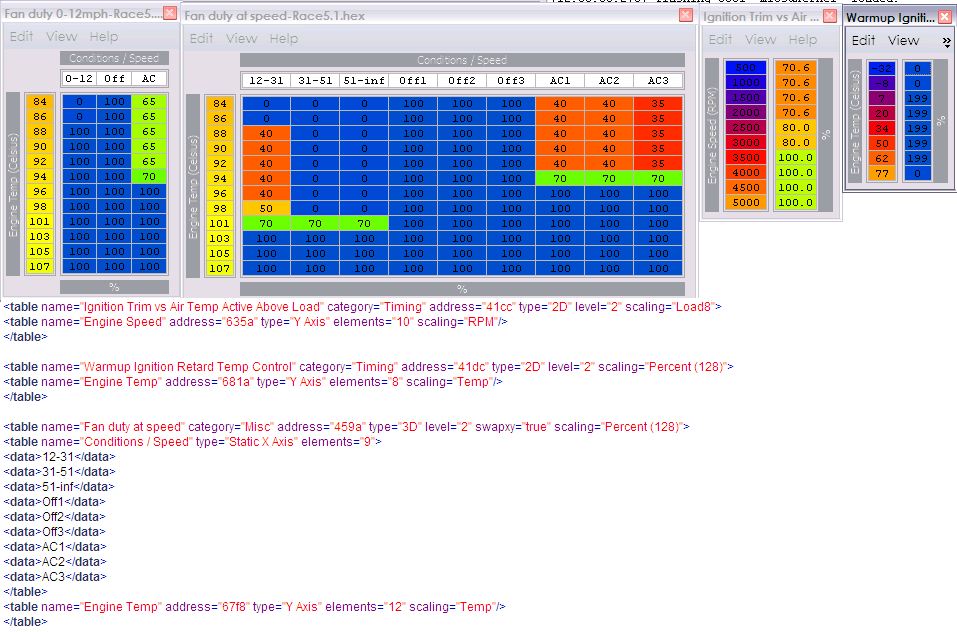
BTW, the fan maps definately work. I had them all set to 100 for this past weekend's race. They stayed on all the time, both fans. lol... not sure if that helped or hurt though. I noticed I was overheating on day 2. I think maybe my antifreeze/water/water wetter mixture may have been off though... a good deal of coolant had vaporized.
BTW, the fan maps definately work. I had them all set to 100 for this past weekend's race. They stayed on all the time, both fans. lol... not sure if that helped or hurt though. I noticed I was overheating on day 2. I think maybe my antifreeze/water/water wetter mixture may have been off though... a good deal of coolant had vaporized.
Last edited by honki24; Oct 14, 2008 at 09:14 AM.
Thread Starter
Evolved Member
Joined: Apr 2008
Posts: 604
Likes: 0
From: Sydney, Australia
Evo8uk you still have something wrong and you may have used some of the above addresses for other maps. I dont think I made it clear which maps were for what addresses. On your rom the temperature range is different but it should show temps from 77C to 103C. The temp scale address is 5ca2 for 97250001.
I may have tracked down the MUT location for logging the other fan. I will do a little testing today if I get a chance, just depends how busy I get at the shop.
For those that want to have a play with logging one of the fans. Add this line to your Evoscan / Data Settings / Data.xml
<DataListItem DataLog="N" Color="" Display="Thermo Fan Duty" LogReference="Thermo" RequestID="84" Eval="x/1.28" Unit="%" MetricEval="" MetricUnit="" ResponseBytes="1" GaugeMin="0" GaugeMax="100" ChartMin="0" ChartMax="100" ScalingFactor="1" Notes="Testing - Thermo Fan" Priority="1" Visible="False" />
I am pretty sure this is the front fan, but hopefully I will know for sure after some further testing.
I may have tracked down the MUT location for logging the other fan. I will do a little testing today if I get a chance, just depends how busy I get at the shop.
For those that want to have a play with logging one of the fans. Add this line to your Evoscan / Data Settings / Data.xml
<DataListItem DataLog="N" Color="" Display="Thermo Fan Duty" LogReference="Thermo" RequestID="84" Eval="x/1.28" Unit="%" MetricEval="" MetricUnit="" ResponseBytes="1" GaugeMin="0" GaugeMax="100" ChartMin="0" ChartMax="100" ScalingFactor="1" Notes="Testing - Thermo Fan" Priority="1" Visible="False" />
I am pretty sure this is the front fan, but hopefully I will know for sure after some further testing.
Thread Starter
Evolved Member
Joined: Apr 2008
Posts: 604
Likes: 0
From: Sydney, Australia
Honki - The control map is based on 256 , not 128. You can create yourself another scale as Percent (256) but change the calculations to match. If you zero this map it wont use the warmup maps.
Thanks for the new temp address
From what i understand the ralliart rom is designed to cut the fans in earlier (Which it does). Is this why the temp scale is from 70 to 103 as opposed to 77 to 103 as suggested if i was to change the temp scale to 77 to 103 would it put the fan operation back to as it was as standard? I believe theres no reason why the fans should come in as early as they do on the ralliart rom and would like to put fan operation back to standard.

From what i understand the ralliart rom is designed to cut the fans in earlier (Which it does). Is this why the temp scale is from 70 to 103 as opposed to 77 to 103 as suggested if i was to change the temp scale to 77 to 103 would it put the fan operation back to as it was as standard? I believe theres no reason why the fans should come in as early as they do on the ralliart rom and would like to put fan operation back to standard.
Thread Starter
Evolved Member
Joined: Apr 2008
Posts: 604
Likes: 0
From: Sydney, Australia
I would be wary of changing the scaling numbers on the side. It would be better to change the map by just copying in the previous rom's values to match the same temperatures. Be sure to read my posts above about what the columns mean.

