


Virtual Dyno Room-Dyno Simulator


Well, I just DLed 5.71 and was surprised to discover my car is making about 8 more whp and torque than I thought! However, when I entered in one of my pulls back when the car only had an intake and a tune, the peak torque numbers seemed a bit high.
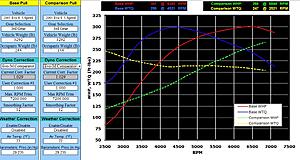
The base pull is my most recent , the comparison is when the car was mostly stock.
The comparison pull in this log in VDR5.5 is the same as the comparison in VDR5.71

Low end torque seems a bit high...
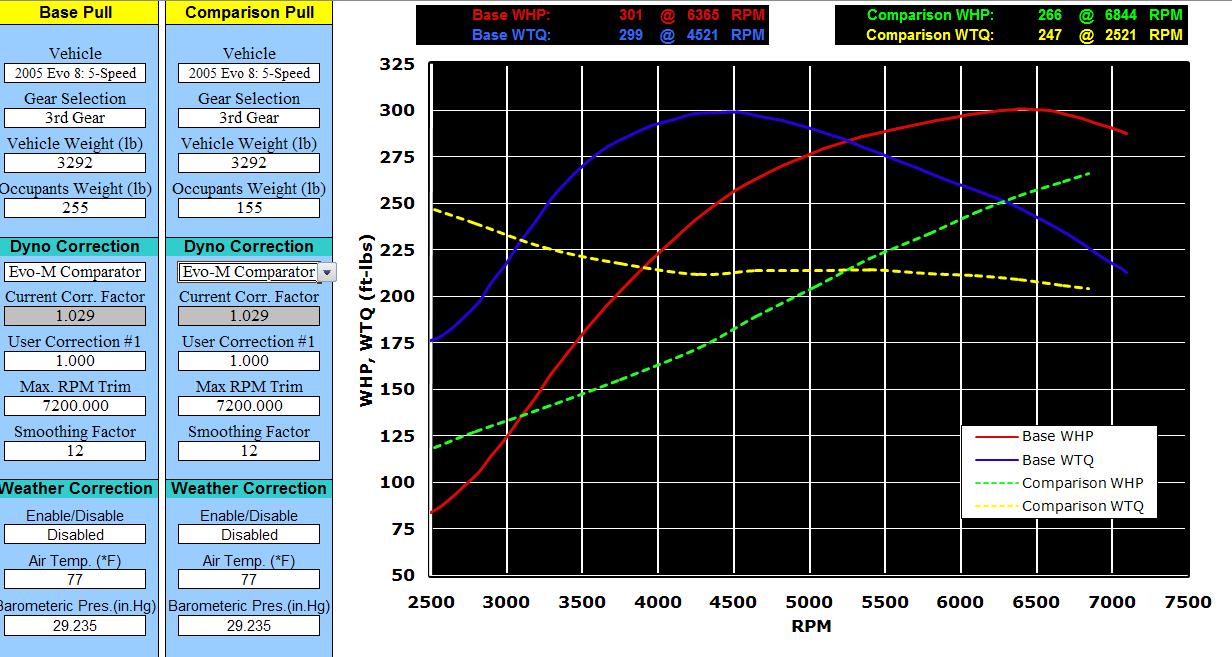
The base pull is my most recent , the comparison is when the car was mostly stock.
The comparison pull in this log in VDR5.5 is the same as the comparison in VDR5.71

Low end torque seems a bit high...


I think I may make a video tutorial on how to use this program this weekend if I can find the time, similar to the Tephra patch video I made. It should help first time users,plus people who use it now but may not fully understand some of the settings. I may create a new thread when I do that since so much has changed since the first post.
I'm also looking into how to make it easier for DSMlink users to use this program with their log files. I have a DSMlink datalog sitting in my e-mail, just need free time to take a peek at it.
Has anyone found any bugs with the latest v5.71 yet??? I was kind of getting used to everyone finding bugs in it on a regular basis
I'm also looking into how to make it easier for DSMlink users to use this program with their log files. I have a DSMlink datalog sitting in my e-mail, just need free time to take a peek at it.
Has anyone found any bugs with the latest v5.71 yet??? I was kind of getting used to everyone finding bugs in it on a regular basis
Last edited by Jack_of_Trades; Sep 17, 2009 at 07:41 PM.

DSMlink files appear to have the decimal point shifted 6 places to the right. I might just add a checkbox on the Data Entry page foe DSMlink users which will simply move the decimal place over so it does the conversion for you. Let me see what I can do. Unless someone knows how to have a column in excel move the decimal point over 6 places and allows the 'new' values to be copied and pasted into my program??? I'm still new to excel.
Figured it out for now:
Don't forget to delete the rows that weren't done during wide-open throttle! Only copy/paste data while you had it floored! The simulator only accepts up to 2000 rows of data.
.
- in an unused cell (in excel of course), enter the number 1000000
- RIGHT-CLICK on that cell and select 'COPY'
- then RIGHT-CLICK your the header for your 'Time stamp' column so it highlights everything in that column
- select 'PASTE SPECIAL'
- select 'DIVIDE' and hit enter.
- all done.
Don't forget to delete the rows that weren't done during wide-open throttle! Only copy/paste data while you had it floored! The simulator only accepts up to 2000 rows of data.
.
Last edited by Jack_of_Trades; Sep 18, 2009 at 05:32 AM.

4th gear pulls arent showing up for me... If left as a 3rd gear pull, it shows, but is way off. If I change it to a 4th gear pull in the drop down, it shows nothing.
edit: only the "comparison"
edit: only the "comparison"
Last edited by nonschlont; Sep 17, 2009 at 10:07 PM.

So I think I might condense the next revision a bit and would like some feedback. I think I will ditch the Weather Correction Section since it seems 95% of the users don't use it really and they usually do a base pull before doing any tuning on the same day for comparison (just like dyno shops do).
With the saved space I want to put as much data on the Dyno graph page,so here are my thoughts:
File Type: (Dropdown List)
Evoscan Datalog
DSMlink Datalog
(I don't think there is a way to get data from an AEM datalog )
)
Unit of Measure: (Dropdown List)
Imperial
Metric
Vehicle: (Dropdown List)
All Vehicles listed on the 'Vehicle List' page
Gear Selection: (Dropdown List)
3rd Gear
4th Gear
Actual Vehicle Weight: (Manually Entered by User)
Total Occupants Weight: (Manually Entered by User)
Tire Diameter: (Manually Entered by User)
Dyno Type: (Dropdown List)
Any Dyno Type that will be listed on the 'Dyno Corrections' page
Current Correction Factor:
Just Displays the Dyno Correction Factor currently being used
Max RPM Trim: (Dropdown List)
From 6.5k RPM to whatever the highest RPM that was recorded in your datalog (50 RPM increments)
Smoothing Factor: (Dropdown List)
1 to 29 (Increments of 1)
I will move the 'USER Description' part from the 'USER SETTINGS' page to the 'DATA ENTRY' page.
The new list of Tabs on the bottom will be:
DATA ENTRY
DYNO GRAPH
TIRE SIZE CALCULATOR
VEHICLE LIST
DYNO CORRECTIONS
DIRECTIONS
DONATION
Suggestions??????
With the saved space I want to put as much data on the Dyno graph page,so here are my thoughts:
File Type: (Dropdown List)
Evoscan Datalog
DSMlink Datalog
(I don't think there is a way to get data from an AEM datalog
)Unit of Measure: (Dropdown List)
Imperial
Metric
Vehicle: (Dropdown List)
All Vehicles listed on the 'Vehicle List' page
Gear Selection: (Dropdown List)
3rd Gear
4th Gear
Actual Vehicle Weight: (Manually Entered by User)
Total Occupants Weight: (Manually Entered by User)
Tire Diameter: (Manually Entered by User)
Dyno Type: (Dropdown List)
Any Dyno Type that will be listed on the 'Dyno Corrections' page
Current Correction Factor:
Just Displays the Dyno Correction Factor currently being used
Max RPM Trim: (Dropdown List)
From 6.5k RPM to whatever the highest RPM that was recorded in your datalog (50 RPM increments)
Smoothing Factor: (Dropdown List)
1 to 29 (Increments of 1)
I will move the 'USER Description' part from the 'USER SETTINGS' page to the 'DATA ENTRY' page.
The new list of Tabs on the bottom will be:
DATA ENTRY
DYNO GRAPH
TIRE SIZE CALCULATOR
VEHICLE LIST
DYNO CORRECTIONS
DIRECTIONS
DONATION
Suggestions??????

Really? You can output an AEM datalog that opens in excel!? Would you mind explaining how AEM users can do that? Colt4G63 has been DYING to know!

I personally like the weather correction so I can compare *now* to a few months ago. I will admit it is one of the less-used features, but I think it is helpful if it is easy enough to leave. Maybe give weather correction its own tab?
I for one do use the Weather Correction Section. When making changes over a period of time it definately seems to help make the data more accurate for comparison purposes. For instance if you did a log on a day when the outside temperature was 91F and then changed a part and did a log two weeks later when the outside temp was 60F the Whether Correction factor helps make for a more accurate comparison - see attached example.
If you are looking to free up space on the Dyno Craph page couldn't you just move the Weather Correction Section to the User Correction Page or even make a seperate page for it?
Dan (drb)
If you are looking to free up space on the Dyno Craph page couldn't you just move the Weather Correction Section to the User Correction Page or even make a seperate page for it?
Dan (drb)
So I think I might condense the next revision a bit and would like some feedback. I think I will ditch the Weather Correction Section since it seems 95% of the users don't use it really and they usually do a base pull before doing any tuning on the same day for comparison (just like dyno shops do).
With the saved space I want to put as much data on the Dyno graph page,so here are my thoughts:
File Type: (Dropdown List)
Evoscan Datalog
DSMlink Datalog
(I don't think there is a way to get data from an AEM datalog)
Unit of Measure: (Dropdown List)
Imperial
Metric
Vehicle: (Dropdown List)
All Vehicles listed on the 'Vehicle List' page
Gear Selection: (Dropdown List)
3rd Gear
4th Gear
Actual Vehicle Weight: (Manually Entered by User)
Total Occupants Weight: (Manually Entered by User)
Tire Diameter: (Manually Entered by User)
Dyno Type: (Dropdown List)
Any Dyno Type that will be listed on the 'Dyno Corrections' page
Current Correction Factor:
Just Displays the Dyno Correction Factor currently being used
Max RPM Trim: (Dropdown List)
From 6.5k RPM to whatever the highest RPM that was recorded in your datalog (50 RPM increments)
Smoothing Factor: (Dropdown List)
1 to 29 (Increments of 1)
I will move the 'USER Description' part from the 'USER SETTINGS' page to the 'DATA ENTRY' page.
The new list of Tabs on the bottom will be:
DATA ENTRY
DYNO GRAPH
TIRE SIZE CALCULATOR
VEHICLE LIST
DYNO CORRECTIONS
DIRECTIONS
DONATION
Suggestions??????
With the saved space I want to put as much data on the Dyno graph page,so here are my thoughts:
File Type: (Dropdown List)
Evoscan Datalog
DSMlink Datalog
(I don't think there is a way to get data from an AEM datalog
)Unit of Measure: (Dropdown List)
Imperial
Metric
Vehicle: (Dropdown List)
All Vehicles listed on the 'Vehicle List' page
Gear Selection: (Dropdown List)
3rd Gear
4th Gear
Actual Vehicle Weight: (Manually Entered by User)
Total Occupants Weight: (Manually Entered by User)
Tire Diameter: (Manually Entered by User)
Dyno Type: (Dropdown List)
Any Dyno Type that will be listed on the 'Dyno Corrections' page
Current Correction Factor:
Just Displays the Dyno Correction Factor currently being used
Max RPM Trim: (Dropdown List)
From 6.5k RPM to whatever the highest RPM that was recorded in your datalog (50 RPM increments)
Smoothing Factor: (Dropdown List)
1 to 29 (Increments of 1)
I will move the 'USER Description' part from the 'USER SETTINGS' page to the 'DATA ENTRY' page.
The new list of Tabs on the bottom will be:
DATA ENTRY
DYNO GRAPH
TIRE SIZE CALCULATOR
VEHICLE LIST
DYNO CORRECTIONS
DIRECTIONS
DONATION
Suggestions??????