
Notices
ECU Flash

Virtual Dyno - Standalone Software

Thread Tools
 
Search this Thread
 
Old Sep 1, 2011 | 04:48 PM
  #1171  
bbarnhill's Avatar
Thread Starter
Evolved Member
iTrader: (1)
 
Joined: Oct 2008
Posts: 692
Likes: 1
From: Kansas City, KS
hum ... very good point ... I may have to limit the amount of variables viewable at once but that looks like a better way to layout the graphs. Would limiting the number of variables viewable at once be a killer?
Reply
Old Sep 1, 2011 | 08:57 PM
  #1172  
Boosted Tuning's Avatar
Former Sponsor
iTrader: (12)
 
Joined: Jun 2005
Posts: 2,383
Likes: 8
From: Chico, CA (Nor-Cal)
Originally Posted by bbarnhill
hum ... very good point ... I may have to limit the amount of variables viewable at once but that looks like a better way to layout the graphs. Would limiting the number of variables viewable at once be a killer?
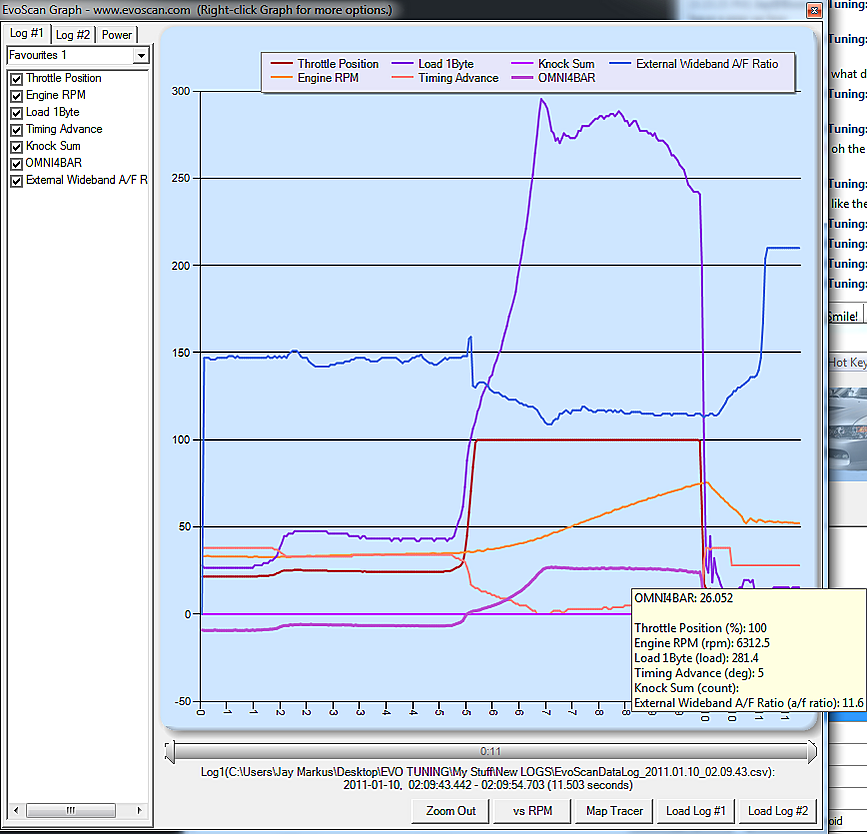
No, dont limit variable. Just dont make the Y axis "silly" like you have it now. I have told you this. Just make it like this...

Attached Thumbnails Virtual Dyno - Standalone Software-untitled.png  
Reply
Old Sep 2, 2011 | 07:54 PM
  #1173  
bbarnhill's Avatar
Thread Starter
Evolved Member
iTrader: (1)
 
Joined: Oct 2008
Posts: 692
Likes: 1
From: Kansas City, KS
everything would have the same scale then ... your finer things like knock wouldnt be visible if you graphed load too ... that make sense?
Reply
Old Sep 2, 2011 | 08:01 PM
  #1174  
bbarnhill's Avatar
Thread Starter
Evolved Member
iTrader: (1)
 
Joined: Oct 2008
Posts: 692
Likes: 1
From: Kansas City, KS
got some dedicated webspace but moving the site is being a pain. So in the next few days when they transfer my domain if I dont have everything moved there may be some server outages till I get it rebuilt. Just warning you guys of the move. Grab it now if you want it or it may be down for a few days.

Thanks ... and bear with me as I move this thing to a more reliable connection and server environment.
Reply
Old Sep 2, 2011 | 08:02 PM
  #1175  
ziad's Avatar
Evolved Member
iTrader: (1)
 
Joined: Apr 2007
Posts: 529
Likes: 1
From: Melbourne
Multipliers man
Reply
Old Sep 2, 2011 | 08:49 PM
  #1176  
Boosted Tuning's Avatar
Former Sponsor
iTrader: (12)
 
Joined: Jun 2005
Posts: 2,383
Likes: 8
From: Chico, CA (Nor-Cal)
Originally Posted by bbarnhill
everything would have the same scale then ... your finer things like knock wouldnt be visible if you graphed load too ... that make sense?
Its called "scaling factor". Thats how to make it work with one y axis.

Like in the pic I posted, the wideband data is scaled by a factor of 10. Otherwise it would be smooched at the bottom and you wouldnt be able to see small changes in it.
Reply
Old Sep 3, 2011 | 01:34 AM
  #1177  
evoscan's Avatar
Silver Sponsor
15 Year Member
iTrader: (-1)
 
Joined: Apr 2010
Posts: 886
Likes: 21
From: nz
yep, if you load the EvoScan\SavedDataSettings\*.xml file, each item has a ScalingFactor, it is editable by right clicking the data items list on the main screen. That way you can have a nice single axis, and its very easy to spot knock sum if factor of 10 is applied. i.e. 8 knock will show up as 80 on the chart. and the real values are shown in the EvoScan charts' tooltip.
Reply
Old Sep 3, 2011 | 03:32 AM
  #1178  
VGergo's Avatar
Evolved Member
20 Year Member
iTrader: (3)
 
Joined: Nov 2005
Posts: 566
Likes: 1
From: Hungary
Originally Posted by bbarnhill
hum ... very good point ... I may have to limit the amount of variables viewable at once but that looks like a better way to layout the graphs. Would limiting the number of variables viewable at once be a killer?
If we can view once in 5-6 row data from the log what we can change it would be perfect. How the Motec logging works we can check a complete running and see how fast the turbo boost again after shifting and like this .
Reply
Old Sep 25, 2011 | 06:11 PM
  #1179  
bbarnhill's Avatar
Thread Starter
Evolved Member
iTrader: (1)
 
Joined: Oct 2008
Posts: 692
Likes: 1
From: Kansas City, KS
1.1.3 released. Should fix the permission issues people have been having and a few other issues. I added a few small features. Hope everyone likes it, just start up Virtual Dyno and it should update itself.
Reply
Old Sep 26, 2011 | 04:43 AM
  #1180  
binky's Avatar
Evolved Member
iTrader: (11)
 
Joined: Oct 2007
Posts: 1,430
Likes: 1
From: Connecticut / Massachusetts U.S.A
Originally Posted by bbarnhill
1.1.3 released. Should fix the permission issues people have been having and a few other issues. I added a few small features. Hope everyone likes it, just start up Virtual Dyno and it should update itself.
Sweet


-Bink
Reply
Old Sep 26, 2011 | 07:29 AM
  #1181  
ferocus's Avatar
Newbie
 
Joined: Aug 2009
Posts: 31
Likes: 0
From: Bucharest, Romania
There is something wrong with 1.1.3 update
My car had 485 WHP on 1.1.2 and now 1.1.3 shows 1036WHP with the same log
I erased and recreated the profile and I got 1036 again.
Reply
Old Sep 26, 2011 | 08:58 AM
  #1182  
bbarnhill's Avatar
Thread Starter
Evolved Member
iTrader: (1)
 
Joined: Oct 2008
Posts: 692
Likes: 1
From: Kansas City, KS
1.1.3 did not have any modifications to the power calculation formulas.

You are welcome to send me that log in question and Ill be glad to look at it. Be sure to tell me what gear it was taken in.
Reply
Old Sep 26, 2011 | 09:13 AM
  #1183  
dude's Avatar
Evolved Member
iTrader: (12)
 
Joined: Dec 2003
Posts: 591
Likes: 0
From: Farmington, NM
My power and tq numbers went up from 1.1.2 as well...same logs.
Reply
Old Sep 26, 2011 | 09:41 AM
  #1184  
ferocus's Avatar
Newbie
 
Joined: Aug 2009
Posts: 31
Likes: 0
From: Bucharest, Romania
In File->Options->Graph there is "Metric Wght and temp"
If it's ticked when I do "Load run" I get 1036 whp
If it's un-ticked I get 485 whp
Reply
Old Sep 26, 2011 | 10:04 AM
  #1185  
bbarnhill's Avatar
Thread Starter
Evolved Member
iTrader: (1)
 
Joined: Oct 2008
Posts: 692
Likes: 1
From: Kansas City, KS
Its probably because if its checked your weight is in KG instead of LBS. Thats a new feature in this edition.
Reply


All times are GMT -7. The time now is 04:47 AM.