


HOW TO: Improving SST Throttle Response


Thread Starter
Evolving Member
Joined: Jan 2009
Posts: 150
Likes: 0
From: Singapore
HOW TO: Improving SST Throttle Response
Here's a tweak that I have been using for a while. For those who aren't aware, the various SST modes (Normal, Sport, S-Sport) affects the shift point (RPM), shift speed, clamping pressure as well as throttle response.
Apart from the SST Throttle Requested Torque Ramp Rate tables which you can tweak, there's a few other "Unknown" tables which can be tweaked for further response improvement.
But first, thanks to Richard (richardjh) and Bryan (razorlab) for the SST Tables thread back in 2012: https://www.evolutionm.net/forums/ec...nt-thread.html
However, the SST Unknown #1 to #5 tables are not correctly named. Richard subsequently provided the correct description which prompted me to explore further.
Here's how I have named them in my XML:

The tables of interest here are the Unknown #3 to #5 for the various SST modes. For those looking for a quick and dirty way to tweak them is to simply copy the values from the 2011 onwards model for table SST Unknown #3 and #4.
You should see noticeable improvement for both the Normal and Sport mode.
Unknown #5 (Super Sport) table is the same for 2008 to 2014 models from what I have seen so far.
Have fun and Merry Christmas!
2008 Model:
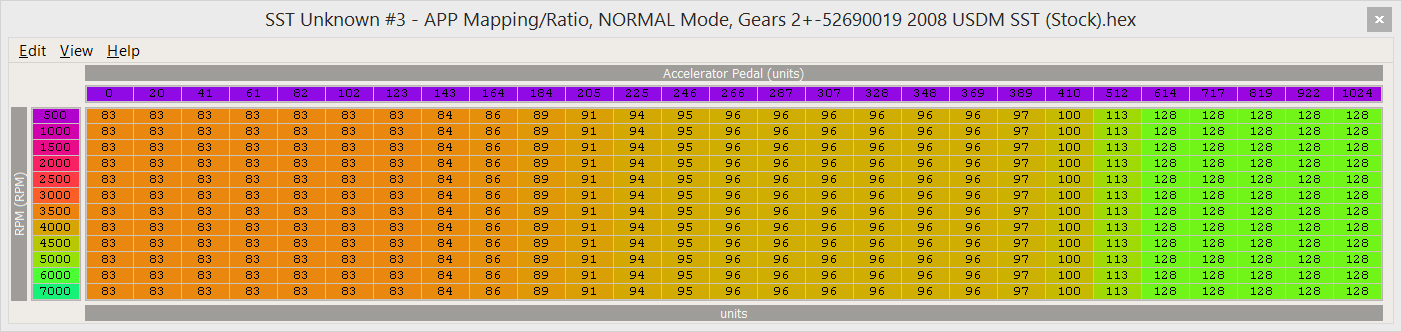
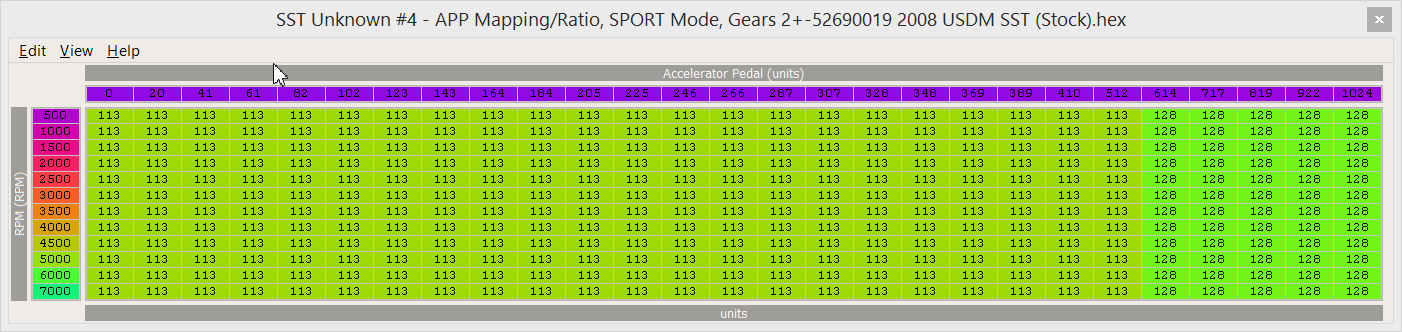
2011+ Model:
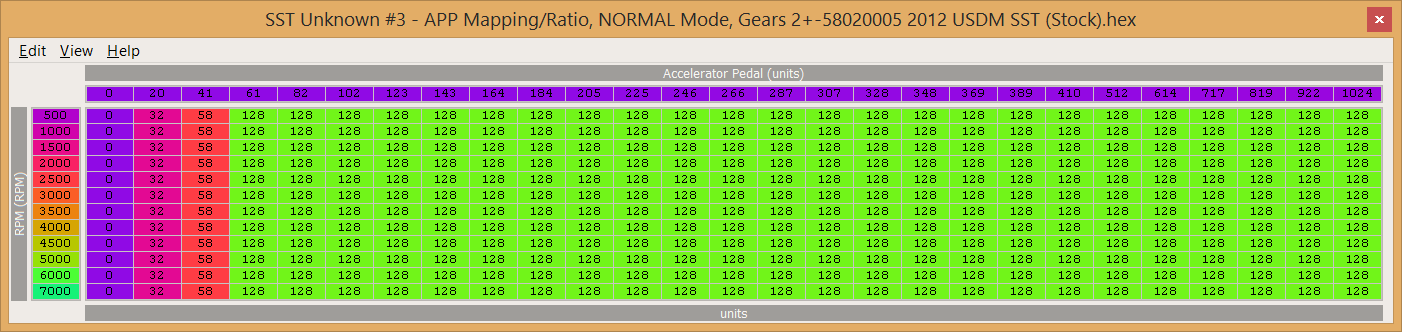
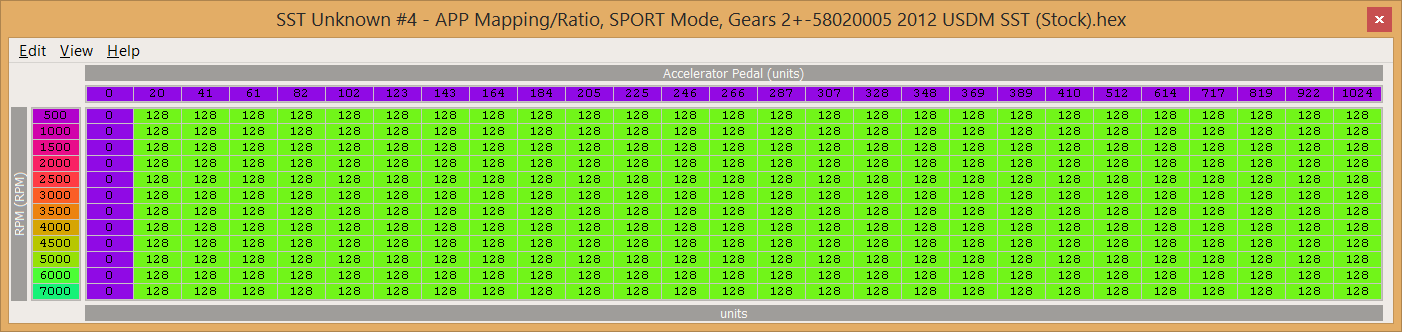
Apart from the SST Throttle Requested Torque Ramp Rate tables which you can tweak, there's a few other "Unknown" tables which can be tweaked for further response improvement.
But first, thanks to Richard (richardjh) and Bryan (razorlab) for the SST Tables thread back in 2012: https://www.evolutionm.net/forums/ec...nt-thread.html
However, the SST Unknown #1 to #5 tables are not correctly named. Richard subsequently provided the correct description which prompted me to explore further.
Here's how I have named them in my XML:
The tables of interest here are the Unknown #3 to #5 for the various SST modes. For those looking for a quick and dirty way to tweak them is to simply copy the values from the 2011 onwards model for table SST Unknown #3 and #4.
You should see noticeable improvement for both the Normal and Sport mode.
Unknown #5 (Super Sport) table is the same for 2008 to 2014 models from what I have seen so far.
Have fun and Merry Christmas!
2008 Model:
2011+ Model:
Last edited by RS200Z; Jan 18, 2015 at 04:18 AM.
Thread Starter
Evolving Member
Joined: Jan 2009
Posts: 150
Likes: 0
From: Singapore
*Reserved for XML Definitions*
52690019 / 52690021 - 2008 USDM SST
52690019 / 52690021 - 2008 USDM SST
Code:
<scaling name="AcceleratorPedal1024 %" units="%" toexpr="100*x/1024" frexpr="x/100*1024" format="%.1f" min="0" max="100" inc="0.5" storagetype="uint16" endian="big"/>

<table name="SST Unknown #3 - APP Mapping/Ratio, NORMAL Mode, Gears 2+" category="SST" address="585e3" type="3D" level="3" scaling="uint8">
  <table name="Accelerator Pedal" address="61874" type="X Axis" elements="27" scaling="AcceleratorPedal1024 %"/>
  <table name="RPM" address="618ec" type="Y Axis" elements="12" scaling="RPM"/>
</table>

<table name="SST Unknown #4 - APP Mapping/Ratio, SPORT Mode, Gears 2+" category="SST" address="5872f" type="3D" level="3" scaling="uint8">
  <table name="Accelerator Pedal" address="61874" type="X Axis" elements="27" scaling="AcceleratorPedal1024 %"/>
  <table name="RPM" address="618ec" type="Y Axis" elements="12" scaling="RPM"/>
</table>

<table name="SST Unknown #5 - APP Mapping/Ratio, S-Sport Mode, Gears 2+" category="SST" address="5887b" type="3D" level="3" scaling="uint8">
  <table name="Accelerator Pedal" address="61874" type="X Axis" elements="27" scaling="AcceleratorPedal1024 %"/>
  <table name="RPM" address="618ec" type="Y Axis" elements="12" scaling="RPM"/>
</table>
Last edited by RS200Z; Dec 28, 2014 at 02:02 AM.

Newbie
Joined: Oct 2011
Posts: 18
Likes: 0
From: Brazil
I've tuned these tables as well. Try the following scale for APP and you'll see it makes a lot more sense.
52690019 / 52690021 - 2008 USDM SST
52690019 / 52690021 - 2008 USDM SST
Code:
<scaling name="AcceleratorPedal1024 %" units="%" toexpr="100*x/1024" frexpr="x/100*1024" format="%.1f" min="0" max="100" inc="0.5" storagetype="uint16" endian="big"/>

<table name="SST Unknown #3 - APP Mapping/Ratio, NORMAL Mode, Gears 2+" category="SST" address="585e3" type="3D" level="3" scaling="uint8">
  <table name="Accelerator Pedal" address="61874" type="X Axis" elements="27" scaling="AcceleratorPedal1024 %"/>
  <table name="RPM" address="618ec" type="Y Axis" elements="12" scaling="RPM"/>
</table>

<table name="SST Unknown #4 - APP Mapping/Ratio, SPORT Mode, Gears 2+" category="SST" address="5872f" type="3D" level="3" scaling="uint8">
  <table name="Accelerator Pedal" address="61874" type="X Axis" elements="27" scaling="AcceleratorPedal1024 %"/>
  <table name="RPM" address="618ec" type="Y Axis" elements="12" scaling="RPM"/>
</table>

<table name="SST Unknown #5 - APP Mapping/Ratio, S-Sport Mode, Gears 2+" category="SST" address="5887b" type="3D" level="3" scaling="uint8">
  <table name="Accelerator Pedal" address="61874" type="X Axis" elements="27" scaling="AcceleratorPedal1024 %"/>
  <table name="RPM" address="618ec" type="Y Axis" elements="12" scaling="RPM"/>
</table>


Thread Starter
Evolving Member
Joined: Jan 2009
Posts: 150
Likes: 0
From: Singapore


Trending Topics

Newbie
Joined: Aug 2014
Posts: 3
Likes: 0
From: West Coast


Thread
Thread Starter
Forum
Replies
Last Post
superscout03
Evo General
11
Apr 10, 2006 10:57 PM
StinkyTofu
Evo Engine / Turbo / Drivetrain
2
Nov 24, 2003 06:21 PM