When you click on links to various merchants on this site and make a purchase, this can result in this site earning a commission. Affiliate programs and affiliations include, but are not limited to, the eBay Partner Network.
hey guys, im trying to input these values to log, but unfortunately im getting an XML Error, says i cant save the file until XML errors are corrected, problem is this is a fresh install of evoscan, and i have not changed anything in the XML other then the omni 4bar settings found here https://www.evolutionm.net/forums/ec...evo-8-9-a.html
also with the newest version there are some ECU and vehicle choices, for some reason it wants to default to 1g DSM. do i use ACD evo 7-8-9? i changed the Omni XML in the MutII EFI XML.
any help would be appreciated. my car is a USDM 9MR
EDIT:
so instead of doing it that way (add new item) i just went directly into the XML and replaced WB02 logging value with the AEM Widebands values seen in the first post. it seemed to change it without error, hopefully it logs.
edit#2 and it does log! The formula is definately off at WOT. Is messing with the formula literally trial and error?
Is there a good thread around here that explains evoscans map tracing feature a little better? The table it shows when I load a log is not at all what I have in ecuflash. (But I’ll leave that for the correct thread)
Last edited by UrbanSmoker; May 23, 2019 at 09:32 AM.
Prerequisites...
-Tactrix Cable
-AEM EUGO wideband (already installed and working)
-Evoscan (installed on a laptop so you can plug into the car using the tactrix cable to take logs)
-Lancer evolution 8 ecu
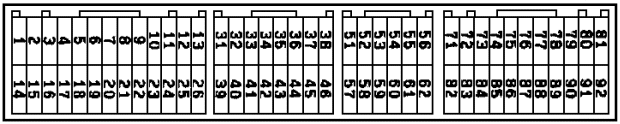
Step one cut wire connecting to pin 75 leaving some wire hanging out of the ECU , you will tap into this wire with your aem gauge . Your aem gauge will have red , black , blue , and white wire coming out of it . The red and black are, red for power, and black for ground these 2 wires power your aem gauge, the white wire is an analog output wire you will be connecting this wire to the wire going into pin 75 on the ecu.
step two
Launch evoscan
step three
Right click any scanning object in the list and click the option edit data item.
click add new item in the bottom left hand corner , new item option will apear on the right hand side where you will input all the data from the next screenshot.
I tried this 0.03913*x+10 formula but my AFR display on the Gauge and what was displayed on the log were off by 1 so I edited the formula to 0.03913*x+9 ...
do you have this info for AEM x series 4.9 LSU sensor gauge? They are quite different, as more people get the newer gauge the settings would be nice to have access to. (The gauges and sensors are completely different)