


Virtual Dyno - Standalone Software


Being able to plot an average between a couple runs would be good, but I wouldn't do it the way mustang does. They average only one run. I dont think averaging one run wouldn't be all that useful, but averaging multiple runs would be very useful in VD.

Thread Starter
Evolved Member
iTrader: (1)
Joined: Oct 2008
Posts: 692
Likes: 1
From: Kansas City, KS
I should revise that it wont work and say ... I dont think it will work. How would you merge the RPMs and Time together as they could be totally out of sync between logs but thats what calculates power.

Evolved Member
Joined: Sep 2006
Posts: 800
Likes: 0
From: Newcastle, Australia.
Hey Brad,
Great piece of software, thanks again.
Quick issue, though, VD on both my desktop running Win7 x64 and my tuning laptop running XP SP3, have an issue where VD won't open now.
You launch it and it shows active on the task bar, but won't pop up.
Both are 1.1.8.
Any ideas? Has done this before as well.
Great piece of software, thanks again.
Quick issue, though, VD on both my desktop running Win7 x64 and my tuning laptop running XP SP3, have an issue where VD won't open now.
You launch it and it shows active on the task bar, but won't pop up.
Both are 1.1.8.
Any ideas? Has done this before as well.

Evolved Member


Joined: May 2010
Posts: 500
Likes: 4
From: Australia
Happens to me too. Only way to get it to open is to have the laptop connected to the internet. If it does not have a net connection, like when Im out in the car with the laptop, it wont open.
Hey Brad,
Great piece of software, thanks again.
Quick issue, though, VD on both my desktop running Win7 x64 and my tuning laptop running XP SP3, have an issue where VD won't open now.
You launch it and it shows active on the task bar, but won't pop up.
Both are 1.1.8.
Any ideas? Has done this before as well.
Great piece of software, thanks again.
Quick issue, though, VD on both my desktop running Win7 x64 and my tuning laptop running XP SP3, have an issue where VD won't open now.
You launch it and it shows active on the task bar, but won't pop up.
Both are 1.1.8.
Any ideas? Has done this before as well.
Thread Starter
Evolved Member
iTrader: (1)
Joined: Oct 2008
Posts: 692
Likes: 1
From: Kansas City, KS
VD doesnt care if its connected to the internet or not ... it just uses that to check for updates. There is a bug that when it closes it writes the wrong values to the saved file for restoring the window to the proper size and location. Look in c:\users\<username>\appdata\Roaming\Virtual Dyno\graphsettings.xml
It will have -32000 for both top and left. Set those to 0 and you should be good to go. I am having a bit of trouble finding this bug as the code looks fine to me. It basically reopens VD completely off the screen.
It will have -32000 for both top and left. Set those to 0 and you should be good to go. I am having a bit of trouble finding this bug as the code looks fine to me. It basically reopens VD completely off the screen.
Evolved Member
Joined: Sep 2006
Posts: 800
Likes: 0
From: Newcastle, Australia.
Thanks for the response Brad.
Didn't fix it though, my 'graphsettings.xml' file was located in:
c:\program files x86\Virtual Dyno\graphsettings.xml
Is this the correct one to edit?
When opening, the following was in there which looks correct to me.
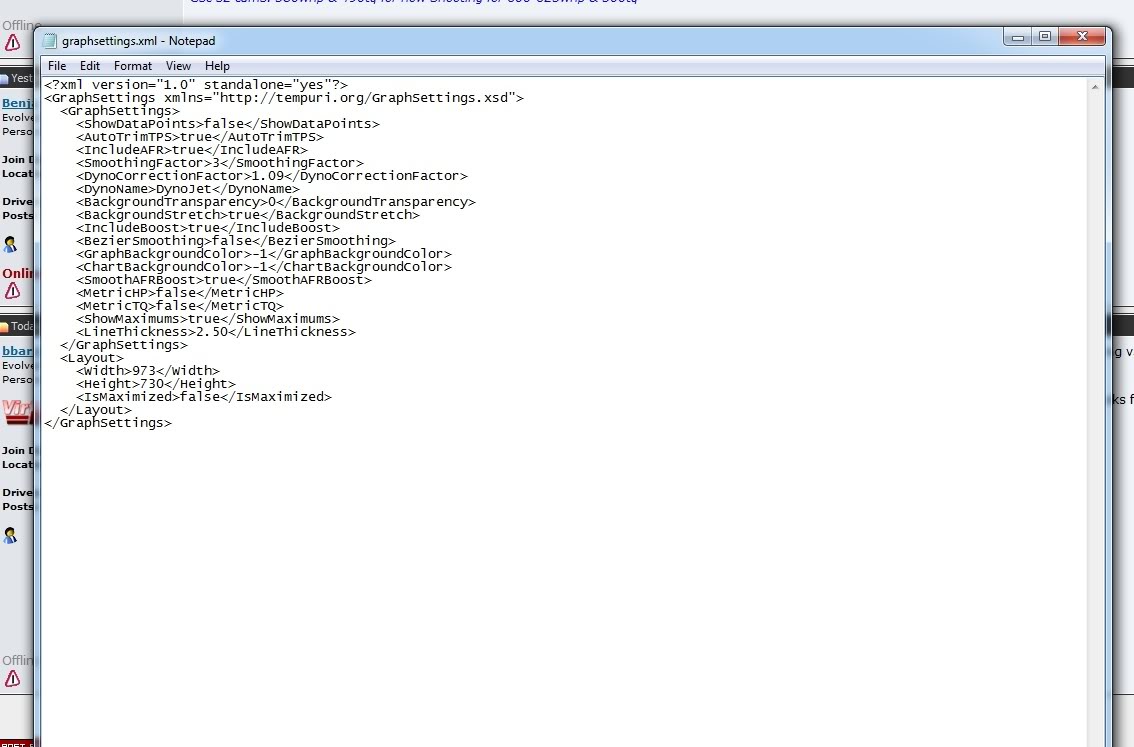
Didn't fix it though, my 'graphsettings.xml' file was located in:
c:\program files x86\Virtual Dyno\graphsettings.xml
Is this the correct one to edit?
When opening, the following was in there which looks correct to me.
Thread Starter
Evolved Member
iTrader: (1)
Joined: Oct 2008
Posts: 692
Likes: 1
From: Kansas City, KS
underneath IsMaximized add these two lines:
<Left>0</Left>
<Top>0</Top>
Let me know if that helps. We WILL get to the bottom of this. If that doesnt work try deleting that graphsettings.xml file completely.
<Left>0</Left>
<Top>0</Top>
Let me know if that helps. We WILL get to the bottom of this. If that doesnt work try deleting that graphsettings.xml file completely.
Evolved Member
Joined: Sep 2006
Posts: 800
Likes: 0
From: Newcastle, Australia.
Added those lines Brad, that didn't fix it.
BTW this is only on my Win7 x64 machine, my XP SP3 laptop used for tuning was fixed by just right clicking the taskbar icon and selecting 'Maximise', the graphsettings.xml file on the XP machine also when edited as above didn't change the problem.
Cheers
Ben
BTW this is only on my Win7 x64 machine, my XP SP3 laptop used for tuning was fixed by just right clicking the taskbar icon and selecting 'Maximise', the graphsettings.xml file on the XP machine also when edited as above didn't change the problem.
Cheers
Ben
Evolved Member
Joined: May 2010
Posts: 500
Likes: 4
From: Australia
Damn, got a new laptop (running same OS - W7 64bit) and its doing it constantly now. Have to uninstall and reinstall to get it working. Tried what you suggested for Benny and it didn't work for me either.
Thread Starter
Evolved Member
iTrader: (1)
Joined: Oct 2008
Posts: 692
Likes: 1
From: Kansas City, KS
So it shows up on the task bar but if you click on the task bar icon it doesnt show the window at all?
This is due to it saving the location of the last known window position incorrectly. Thats why if you close out of the program and go look in your graphsettings.xml file you will see that there is a -35000 as the screen locations.
This is due to it saving the location of the last known window position incorrectly. Thats why if you close out of the program and go look in your graphsettings.xml file you will see that there is a -35000 as the screen locations.