


Virtual Dyno - Standalone Software


Thread Starter
Evolved Member
iTrader: (1)
Joined: Oct 2008
Posts: 692
Likes: 1
From: Kansas City, KS
http://www.modified.com/roadtests/05..._ix/index.html
https://www.evolutionm.net/forums/5936589-post10.html
I just dont see anywhere that says there is a difference in the final drive ratio for IX-GSR and IX-MR. If ya find a good place for transmission information, let me know please sir!! Another reason is contrary to what is being said ... I actually did do my own research and never took any information from VDR.
https://www.evolutionm.net/forums/5936589-post10.html
I just dont see anywhere that says there is a difference in the final drive ratio for IX-GSR and IX-MR. If ya find a good place for transmission information, let me know please sir!! Another reason is contrary to what is being said ... I actually did do my own research and never took any information from VDR.
Thread Starter
Evolved Member
iTrader: (1)
Joined: Oct 2008
Posts: 692
Likes: 1
From: Kansas City, KS
Ill look into the scrollable graph and I know of another issue when you rename runs. I was looking into it last night when I passed out. Ill look at it today hopefully. There may be a 1.0.5 just to fix some small issues.
Thread Starter
Evolved Member
iTrader: (1)
Joined: Oct 2008
Posts: 692
Likes: 1
From: Kansas City, KS
I feel bad that I work on this and get enough changes to put out a new version every couple of days. I wish I had the server to put this on that I could add an auto update feature but since this is hosted on my actual machine at my house ... dont think Ill do that right now.
1.0.5 changes thus far:
- Settings are now not saved on graph settings window close via the X
- Fixed a bug when renaming logs that caused a fatal error
- Added adjustable Auto Trim TPS value to the settings screen
- Added cancel zoom button to the quick action bar
- Load runs even if file is already open in another program (non-exclusive file access)
- Increased the sensitivity of smoothing
Im working on adding boost to the bottom graph but the scaling is being a little bit of a *****.
If you can think of anymore PLEASE let me know. Im running out of things to add for 5. If nothing else comes in Im going to start working on saving profiles of cars so you can default all to a set of saved profiles. Probably going to do a small release of 5 first and make that the big project for 6. What do you guys think?
1.0.5 changes thus far:
- Settings are now not saved on graph settings window close via the X
- Fixed a bug when renaming logs that caused a fatal error
- Added adjustable Auto Trim TPS value to the settings screen
- Added cancel zoom button to the quick action bar
- Load runs even if file is already open in another program (non-exclusive file access)
- Increased the sensitivity of smoothing
Im working on adding boost to the bottom graph but the scaling is being a little bit of a *****.
If you can think of anymore PLEASE let me know. Im running out of things to add for 5. If nothing else comes in Im going to start working on saving profiles of cars so you can default all to a set of saved profiles. Probably going to do a small release of 5 first and make that the big project for 6. What do you guys think?
Last edited by bbarnhill; Jul 15, 2010 at 12:31 AM.
Thread Starter
Evolved Member
iTrader: (1)
Joined: Oct 2008
Posts: 692
Likes: 1
From: Kansas City, KS
Thats a limitation of the graphing library as far as I know. Ill keep looking for it but I dont think I can have seperate font attributes in the legend. I might be able to do a transparent label overlay but getting it set at the right spot even with screen resize is going to be a fun one. Ill work on that though.
I figured the opening of the file in shared mode so that you could still have it open in excel would be a godsend ... but noone has mentioned it.
Im working on getting boost in there too ... Ive got it graphing I just am having a time getting the scale and title to show up on the right. Then again I was passing out at the keyboard again when I was trying to figure that one out.
I figured the opening of the file in shared mode so that you could still have it open in excel would be a godsend ... but noone has mentioned it.
Im working on getting boost in there too ... Ive got it graphing I just am having a time getting the scale and title to show up on the right. Then again I was passing out at the keyboard again when I was trying to figure that one out.

Account Disabled
iTrader: (38)
Joined: Aug 2005
Posts: 9,319
Likes: 1
From: Virginia Beach, Virginia
cool, hopefully can figure it out, it just makes it easier to find what's important
actually I was getting annoyed with having to close my excel spreadsheet, but was living with it, so thanks for fixing that Now I can see the raw data and graph side by side again, every useful tool for tuning
actually I was getting annoyed with having to close my excel spreadsheet, but was living with it, so thanks for fixing that
Now I can see the raw data and graph side by side again, every useful tool for tuning


u can change the font/size etc for the title etc when using zedgraph.... i dont have my code with me at work... will look at it at home later tonight if u havent been able to find it.


I would love to code this project with you. Let me know as I would like to be part of the team.
Enable/Disable
AFR, Boost, Timing Graph
Show HP/TQ dynojet style
Status Bar so when you mouse over the graph it will display the values.
Smoothing and Correction specific to the run not the graph
Here is my latest rev.
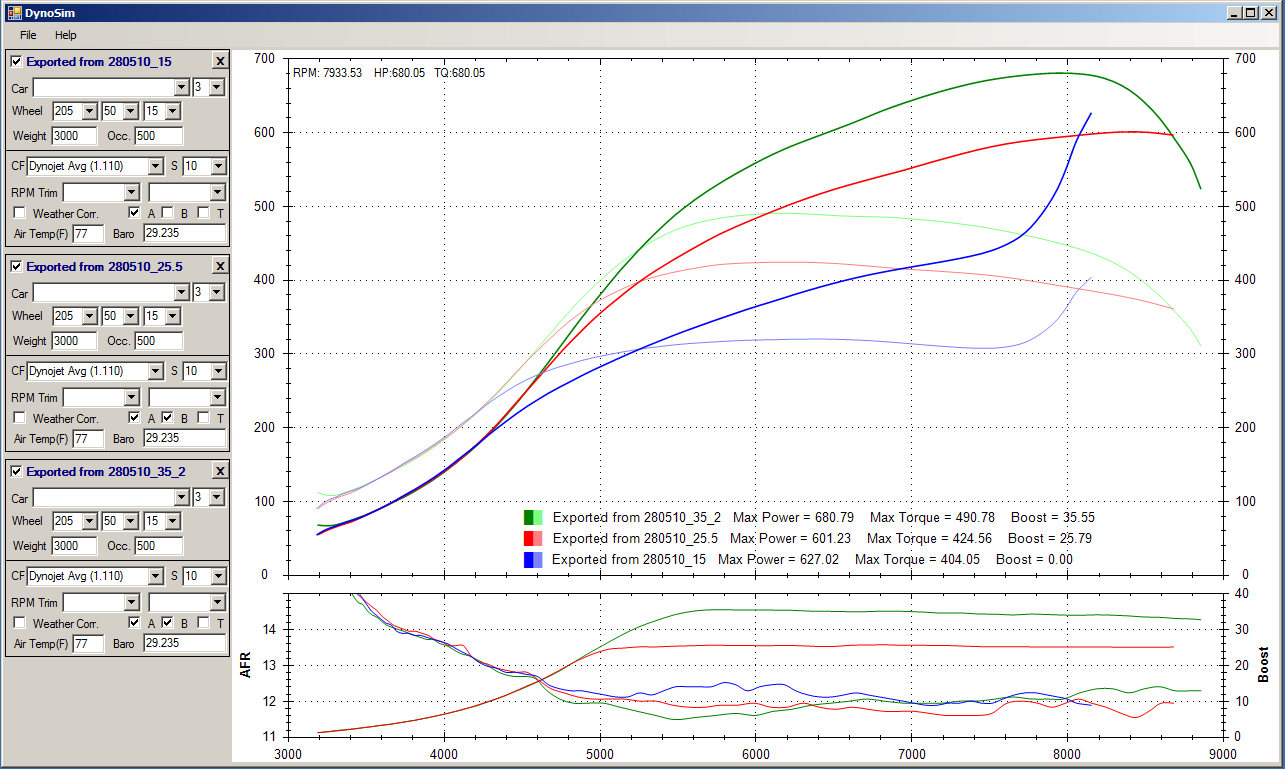
Enable/Disable
AFR, Boost, Timing Graph
Show HP/TQ dynojet style
Status Bar so when you mouse over the graph it will display the values.
Smoothing and Correction specific to the run not the graph
Here is my latest rev.
Last edited by TheBoz; Jul 15, 2010 at 08:00 PM.

I would love to code this project with you. Let me know as I would like to be part of the team.
Enable/Disable
AFR, Boost, Timing Graph
Show HP/TQ dynojet style
Status Bar so when you mouse over the graph it will display the values.
Smoothing and Correction specific to the run not the graph
Here is my latest rev.
<snip>
Enable/Disable
AFR, Boost, Timing Graph
Show HP/TQ dynojet style
Status Bar so when you mouse over the graph it will display the values.
Smoothing and Correction specific to the run not the graph
Here is my latest rev.
<snip>
Thread Starter
Evolved Member
iTrader: (1)
Joined: Oct 2008
Posts: 692
Likes: 1
From: Kansas City, KS
Im just having a little trouble getting the scale to show up on the Y2 side of the graph. Im sure its something small and stupid Im doing but ... Ill find it. Looks like you are smoothing AFR and BOOST as well. Im not currently smoothing them but it would be easy enough to do.
Are you using the regular legend in zedgraph OR are you just drawing those via labels yourself?
Are you using the regular legend in zedgraph OR are you just drawing those via labels yourself?
Thread Starter
Evolved Member
iTrader: (1)
Joined: Oct 2008
Posts: 692
Likes: 1
From: Kansas City, KS
Well this morning was productive ... got boost graphing ... got the scale displaying ... now to clean up the look and do some testing and we shall have another release to get this boost out there.
Hope you guys are still using it.
Hope you guys are still using it.
